Into Whale Valley with Mobile GMaps

A little way into the Sahara, about 130 kilometers southwest of Cairo, you can find Wadi al-Hitan, aka Whale Valley. Over the past 30 years or so remarkable fossils have been discovered here that provide some of the strongest confirmation yet of the soundness of evolutionary theory — namely, fossils of whales with legs that died 40 million years ago in an ancient shallow sea, just as these mammals were returning to an aquatic lifestyle. The species found in this valley are the archetypical missing link, the kind that creationists and their ilk tend to maintain do not exist, ergo natural selection doesn’t happen.

Except that the species did exist, and tomorrow, Saturday, I will be heading out there with some friends, a jeep and a driver. A perfect opportunity, I think, to test the geospatial prowess of my Nokia N95 and some of the mapping apps that have been built for this kind of phone.

The Valley of the Whales is is one of UNESCO’s newest World Heritage sites, but this newfound fame does not mean it is easy to find. It is off the beaten track, and certainly not a tourist destination. In Google Earth, the World Heritage Sites listing under the Google Earth Community Showcase places Whale Valley some 120km to the northwest of its actual location (the coordinates are reversed). The Lonely Planet Guide, in a single terse paragraph, places Whale Valley 55km to the south of Wadi Rayyan, and notes:

To get there is something of an expedition and requires at least two 4WDs, one to help haul the other out in the event of getting stuck in the sand.

Perhaps it was something of an expedition for the Lonely Planet writer because Whale Valley is actually located about 30km to the west of Wadi Rayyan — at least if you go check several further sources, among them a search in Google Earth for indexed KML files, which leads you to this GEC post, which leads you to this page with precise coordinates. Google Earth also returns the boundary coordinates of the entire protected area around Whale Valley — so this is ample cross-referencing to give me the confidence we’re actually going to the right place:-) I’ve collected all the placemarks in one KML file uploaded to the Ogle Earth server.

I have a standard issue Garmin GPS unit, so I will be using that tomorrow to record our track and also enter some of the destination coordinates of some actual fossil sites, to make navigating to our destination easier. This is standard fare for GPS units, and it will be good to have it as a backup.

With the Nokia N95, however, I have three more interesting objectives:

The first is to use its GPS functionality to take georeferenced photos throughout the day and upload them to my Flickr account via Shozu as soon as I have cell phone coverage or wifi access, which means they should show up on this Google Map and on this KML network link as the day progresses. If you’re reading this on Saturday May 12, check out those links during the day to see if we are on our way to accomplishing our mission.

The other objective is to use Mobile GMaps, a free java-based mobile mapping application I came across recently that combines Google Maps satellite tiles with phone-based GPS positioning. That’s better than Nokia’s built in mapping app, which has vector data only, and Google’s own Mobile Maps, which has the imagery but no link to the GPS. In other words, Mobile GMaps shows me where I am on Google Maps, and that’s brilliant. At least in theory; tomorrow we’ll see how well it works in practice, especially as I will likely be out of the mobile phone coverage area, and I don’t know how or if it uses cached tiles.

Another cool feature of Mobile GMaps is that it can display KML files! No, not complicated ones, not even the KML generated by Google Maps, but if you simply collect placemarks in a folder in Google Earth and save them as a KML file and then FTP that file to a server so that it gets a URL, like I have with the coordinates for POIs in Whale Valley, then Mobile GMaps can indeed fetch this KML from the web and display it. Watching KML rendered on my mobile phone for the first time was an unexpected pleasure; I thought this feat would be some way off in the future. (Alas, one thing the N95 cannot do is take pictures of itself, so no screenshots just now.)

So now, in theory, my N95 will show me not only some KML points of interest I have published to the web, but also where I am in relation to them on Google Maps tiles. Can it get any better?

Well, perhaps, because Mobile GMaps has just added web-tracking features. There is an option in the client software on the phone which directs it to ping www.gmap-track.com with my location, which is then displayed on a public map (I’m “OgleEarth”, and almost certainly the only person in Egypt using this service, so it shouldn’t be so hard to find me). This functionality does not work if my phone is out of coverage range, but it should mean that my last known position is available. That’ll be useful for when they come looking for us:-) (Mologogo also does web tracking, but as far as I can tell there is no client for Symbian phones.)

Stay tuned for a travel report and an evaluation of the Nokia N95’s usability in a real-world scenario.

Google LatLong — new official Google “geo” blog

While trawling through my site statistics instead of going to bed, I came upon quite a catch: Google LatLong, a brand new official blog containing “news and notes by the Google Earth and Maps team”.

latlong.jpg

John Hanke writes the inaugural post. Bookmark this blog, subscribe, etc…

Half of all Dutch people have used Google Earth: Report

At a dinner party tonight, somebody mentioned that half of all Dutch people had used Google Earth. I was incredulous. “No, it’s true, I read it on the internet” was the reply. A quick Google later, indeed here is the article in Emerce, in Dutch, dated April 17.

47% of Dutch people have used Google Earth, according to Dutch search engine specialist Checkit and researchers RM Interactive in an annual report they’ve conducted since 2002 on internet habits.

This makes Google Earth by far Google’s most popular non-search product. 90% of the Dutch say they use Google Search; both Google Earth usage and Google Mail usage (at 28%, up from 18% a year ago) are remarkably high. Other products, however, such as Google Mobile, Google Talk, Google Desktop get single digit percentage use, while Picasa manages 11%.

Still, 47%! Who’d have thought that penetration for a standalone downloadable product in a nation of 16.5 million could be that high? The Dutch do benefit from ubiquitous broadband access and a thirst for all things new, so this is a taste of things to come.

Links: DIY GPS, aerial imagery; Open Web Analytics does KML

  • A project for the brave (or foolhardy) among us: DIY GPS adapter for a Nikon DSLR. (Via Photojojo!)
  • And if you thought that was easy, maybe it’s time to build your own OpenSourceQuadroCopter, a four-rotor remote-controlled flying machine that can act as a base for both aerial photography and video. (Make Blog has a great photo.)
  • The FlickrExport plugins for iPhoto and Aperture gets an update. For a while now they send embedded EXIF data to Flickr, which in the case of coordinates, Flickr turns into geotags.
  • Stephen Beat, AKA the Electric Draughtsman, finds a remarkable animation of a SketchUp model of the Titanic on YouTube. (SketchUp model). Its impressive to see what people have done with the application — makes you wish you could walk around on the deck.. or import it into Second Life so you can walk on the deck:-)
  • Just out: MapMemo 3.0, an application for the Mac that visually links files to locations on maps, blueprints and diagrams. ($25)
  • MapWrapper‘s headline is right on the money: Korea Builds BadAss virtual globe for Seoul. ZDNet Korea has the details:

    Seoul Metropolitan government used high quality 3D Geospatial database developed from a 1 meter digital terrain model , texturing 10cm aerial imagery covering 605 square kilometers(1567 square mile), about one million box-shape simple model for general buildings and 1200 accurate model by using actual picture of the major landmarks.

    The accompanying eye candy looks gorgeous.

  • Open Web Analytics, “The Open Source Web Analytics Framework” intended for WordPress and MediaWiki, is up to version 1.0.1, gaining Google Maps and Google Earth support for plotting visitor provenance.
  • Digital Urban notes that Microsoft Virtual Earth 3D is the first of any mainstream virtual globe to get 3D content for whole cities in the UK (albeit in Brighton and Swindon:-). Andrew also wonders if Microsoft’s automatic capture technique might not be more scalable than Google Earth’s SketchUp-based approach. There is a YouTube flyover as well.
  • If you speak Swedish, don’t miss an extensive KML layer detailing the many travels and writings of Linnaeus, the Swedish naturalist and father of taxonomy, born 300 years ago this year.

N95 Corner:

  • Here’s how you make me jealous: SymbianCentral writes that between May and August this year,

    Nokia’s “Project 95” will take Peter Schindler – a seasoned traveler – on a 20,000-plus kilometer, Nokia-solely-sponsored, road-trip across China. Peter will be equipped with various Nokia Nseries devices, most notably the Nokia N95. He will keep a record of his excursions by maintaining a mobile blog that shares his thoughts and images taken through his Nokia N95…

    I sure hope that the GPS feature of the N95 gets used to post georeferenced shots, and if Nokia is savvy, that this all gets published as a goodlooking network link.

  • Twibble is…

    an experimental twitter client application for the Nokia N95. In addition to some basic twitter functionality it can make use of the built-in GPS of the N95 to add your current position to a tweet. The position can be processed by twittervision and twittermap.

    It would be cool if we could get the resulting maps as a KML network link — especially if you could subscribe to the whereabouts of individual users.

  • New version of Nokia Sports Tracker.
  • I don’t know about you, but my Nokia N95 still crashes often, and tends to run out of memory. Complexity is good, but not at the expense of usability, and I think this is the lesson Apple is going to apply to the iPhone. Are you wondering why Apple isn’t letting third-party developers create their own stuff for the iPhone? I suspect it has to do with Steve Jobs insisting customers should never see error messages or need to restart their phone because of a software glitch. The N95 is definitely for tinkerers and technologists, and not for my dad. The iPhone, on the other hand, is going to be easy on the mainstream, and so my initial skepticism towards that phone is now turning into newfound tentative appreciation. Does the iPhone do GPS? No. But is the GPS on the Nokia usable? It depends on your perseverance — and you need some.

Google Earth hits version 4.1… any moment now.

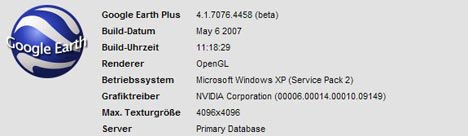
Jan Wesbuer in Zumala, Spain, has just downloaded a new build of Google Earth. It’s version 4.1 (4.1.7076.4458 on the PC) — and I while I can’t download it yet for the Mac from where I am, Jan has included some screenshots with his own commentary, below:

GE-New-Build.jpg

First notice: It has “Tip of the Day”

GE-New-Build-2.jpg

And Watch in Google Maps Button

GE-New-Build-3.jpg

Two more new things: GE-Plus licences can now be deactivated. Tours are now playing much smoother.

Time to obsessively start clicking that download button? I wonder if the Mac version will have 3DConnexion support…

[Update: It has 3DConnexion SpaceNavigator support! And also support for a whole slew of languages: Portuguese, Dutch, Russian, Polish, Korean, Arabic and Czech.]

PollMappr

Sean Gorman at FortiusOne writes they had an “overwhelming urge to launch something” in anticipation of GeoCommons and they’ve come up with pollmappr — “syndicated, geographically aware polls” where the results are displayed in Google Earth according to geographic region. It looks great, is thoroughly web-2.0-ified, and is kinda addictive:

The real challenge becomes thinking of a question where the geographic location of the voter is likely to make a real difference:

The geographic regions are US only (at the moment?) which means you need to come up with US-centric questions, and that my vote from Egypt doesn’t count. So I’m voting by proxy (literally, ha) — for the Boston Red Sox.