- Directions Magazine’s Top 10 for 2006 features GeoRSS, ArcGIS Explorer and… Declan Butler!
- What looks like the final release candidate for NASA World Wind 1.4, RC3, is out (Windows download). The Earth is Square is blogging some of the new features and mentions that the .Net 1.1 version (1.3.6) is on hold. The Java version of NASA World Wind is still forthcoming, reports Bull’s Rambles.
Meanwhile, here’s what’s new in 1.4. Here’s the page listing the remaining bugs in 1.4 RC3.
- In London for the weekend, I managed to pop into the British Museum, where, until 11 February you can see The Past from Above, an exhibition of absolutely amazing aerial photography by Georg Gerster. I only wish I had the opportunity to buy a CD with the images, georeferenced, as a KML file in the shop at the end. No such luck.
- Google will become the archival experts for the 30 terabytes of daily data the Large Synoptic Survey Telescope (LSST) is set to produce when it goes live in 2013. Also on the agenda: making this data accessible to the public. Google Sky, anyone?
- Christian Spanring dissects the latest rumors regarding Apple Mac OS X 10.5 + GPS integration.
Yearly Archives: 2007
Virtual globe conference calendar site goes live
University of Alaska Fairbanks’ John Bailey writes:
Since the sessions at AGU highlighted an interest in and need for this, I have put together a website that provides details on events involving the use of virtual globes in science:
http://conferences.images.alaska.edu/
The idea is that these are conferences, conference sessions, workshops, short courses, etc, that are specifically targeted at scientific use of virtual globes, rather than the technical aspects (e.g. Where 2.0, GeoWeb).
If anyone has an event that they think should be listed please let me know. [Email upon request — Stefan]
Also, please note a couple of impending deadline for currently listed events, most notably 15th Jan for those who wish to submit abstracts and present at the 2nd annual virtual globes scientific users conference (at the 5th ISDE).
Thanks
John
Such conferences certainly seem to be proliferating, so this site is a great idea.
Yelp reviews get a Google Earth default layer
Yelp is a viral recommendation site for US restaurants, bars and shops. This makes it an obvious candidate for the georeferencing of its database, and indeed its website is thoroughly integrated with Google Maps. Now its contents can also be accessed via a base layer in Google Earth.
I wasn’t familiar with Yelp before, but the reviews of my old haunts in the East Village certainly are accurate:

Thus Yelp joins a very small but fortunate set of for-profit companies on whom Google Earth has smiled — Panoramio, Turn Here, Discovery Channel, and now Yelp. And while I cannot be certain for all of them, I suspect the arrangement is similar to the one for the Discovery Channel, where the WSJ reported “Neither side will share in the other’s potential revenue from the service.” That’s because in all cases, the platform benefits from the content, and the content benefits from the platform.
There are of course not-for-profits in the default layers as well, such as UNEP, National Geographic, and the Jane Goodall Institute, which leads me to think that the one thing the organizations Google ends up making content deals with have in common is a passion for what they do, and doing it well. Oh, and not being owned by the competition:-)
3D Warehouse now a Google Earth default layer
Google’s strategy for populating its Earth with 3D textured buildings has just gotten a lot sharper — literally (ha). If you download the newest build, 4.0.2722, the default layers have now started to show this:
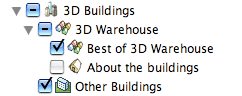
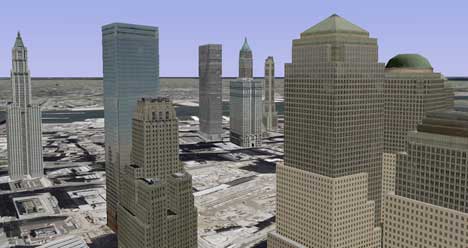
What you get is the best of 3D Warehouse‘s textured buildings uploaded by users, downloaded by default as you zoom in. Smartly, if such buildings are located in spots where gray untextured “placeholder” buildings have been available by default, these have disappeared in favor of the new improved version. Here’s downtown New York with just the 3D Warehouse best-of buildings:
Here’s the same view with the placeholders added:
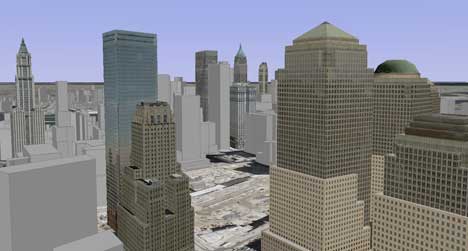
As speculated on Ogle Earth before, and now confirmed, Google is harnessing the creativity of its users to populate its Earth with 3D textured buildings, whereas Microsoft Virtual Earth is engaging in “central planning”, with a concerted effort to map 3D textures onto models using technology from its recent acquisitions. Which is quicker and/or better will become apparent over time.
But what happens when a user deletes a contributed building from 3D Warehouse? I went looking for the answer in the terms of service, and the answer is quite clear (I think): Although you own your content, uploading it to 3D Warehouse gives Google a “perpetual license” to reproduce both the content and derivative works of the content, even if you later remove it from your account. In other words, Google Earth won’t suddenly see its textured buildings go AWOL. Below the fold, the exact wording of the relevant bits of the terms of service…
PS. If you want to see all current 3D Warehouse content, including on older builds of Google Earth, you can still download the 3D Warehouse network link.
[Update 2006-01-08: Flying around some more, it’s clear that in several cities at least, a good portion of the textured buildings are credited to Google, so it looks like Google’s strategy is flexible, filling in the gaps where user content isn’t available.]
Continue reading 3D Warehouse now a Google Earth default layer
Pict’Earth: Live DIY aerial photography
I’ve been trying to wrap my head around Pict’Earth, a remarkable system flagged by Frank that transmits live aerial photography from an unmanned flying drone to a computer on the ground, where it is georeferenced and served to Google Earth or ArcGIS Explorer clients in real time.
It sounds almost too good to be true, but it’s legit. Fabrice Fasquel and David Riallant are French GIS pros. A third listed contact, Thierry Rousselin has his own GIS blog, Géo 212.
So how does it all work? Before live integration with Google Earth and ArcGIS Explorer came along, there was Le Cyclope, a flying drone for taking aerial digital photography, guided remotely by a human via a live video downlink. First developed in 2000, a lot of the technical information is available in French (alas in Flash) on the site of the company that created the kit, Visions du Ciel. What follows are the technical highlights, translated.
The drone weights 2.5 kg, and can fly up to a height of 300 meters and within a circumference of 1 km, at least within the law in France. It’s velocity is between 3-25 km/h, and the engine is electric, with a battery charge that is enough for 15 minutes of flight. The effective resolution of the captured imagery is 4 centimeters per pixel at a height of 150 meters with a 5 megapixel camera. The live video is relayed via a 2.4 Ghz transmitter to a receiver in the field, connected to a laptop or to the pilot’s video goggles.
The drone is very versatile — instead of capturing imagery, it could be made to capture georeferenced temperatures, humidity, luminosity, pollution or radioactivity, on demand, depending on the installed receptor.
To see it in action, there is a video to download (zipped Quicktime) on the site, different from the one Frank found on Google Video.
If you want to buy one, here are the complete technical specifications as a PDF. The price, alas, is only available on demand. (I’ve asked, in the meantime:-) Visions du Ciel also offers a processing service for images captured with the Cyclope, which includes georeferencing and stitching, with a turnaround time of 12-24 hours. Prices here too are on demand.
But what, then, is Pict’Earth? For this new technology, the specifics are not as detailed. From Visions du Ciel‘s product site (alas also in Flash), it is clear that it Pict’Earth adds a layer of functionality to the Cyclope drone by transmitting the photographic imagery it captures, along with GPS data, live to the ground, where it is processed and collated in real time and served in a format readable to Google Earth and ESRI ArcGIS Explorer. It’s not clear whether this format is a simple KML network link, but I suspect it is. As the site makes clear, the intention is to let an analysis team give Cyclope’s pilot live instructions based on the photography being transmitted in real time.
It would be great to see a live demo of this (again, I’ve asked) because I imagine the real tour-de-force lies in the automated real-time georeferencing and stitching of the transmitted photography. If that can really be done at a high level of quality, then I will be impressed, as it strikes me as a particularly difficult task to automate. Perhaps the live transmission of imagery is only intended as an initial first draft, with proper processing after the flight.
In any case, this is a wonderful innovation. Beachfront celebrity weddings will never be safe from paparazzi again:-)
ESRI ArcGIS Explorer Beta gets a tweak
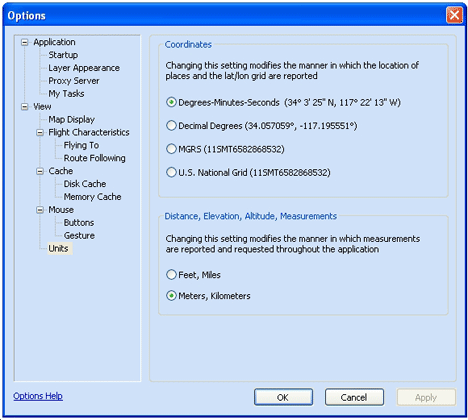
As James Fee noted, a new version of ESRI ArcGIS Explorer Beta is available — build 350, up from build 348. As detailed by the changelog, new in this version are options to use the MGRS and US National Grid coordinate systems:
Preferences for clouds and lighting have been moved from the “Options” pane to a “Map Properties” pane, and these settings are now saved with each globe’s .NMF file, rather than with the application.
You can now also paste a URL link to a KML file to add it to ArcGIS Explorer, though KML support doesn’t appear to have improved — you still can’t see pop-up windows for placemarks, for example.
Otherwise, the criticisms from last week’s review have yet to be remedied — zooming to a placemark still avoids the dateline, the default cloud view is a placeholder, and imagery, labels and borders download slowly.
Google Earth version 4.0.27xx Beta out
There’s a (mostly) bugfix edition of Google Earth out, version 4.0.27xx Beta, with a build date of January 5. The changelog notes the following:
KML Notes:
- <Update> no longer produces error messages when the “Show prompts for all errors” option is used
Major Fixes:
- Improved performance and stability with large number of collada models
- Mac specific bug for time data being shown incorrectly
- All urls in description are now automatically converted to hyperlinks (wrap description with <html>…</html> to avoid this)