University of Alaska Fairbanks’ Matt Nolan has produced an online video that uses his research on Alaska’s McCall Glacier to explain the anatomy of a glacier and how glaciologists do their work. It had me watching with rapt attention. I don’t think I’ve ever learned so much about glaciers in so little time.
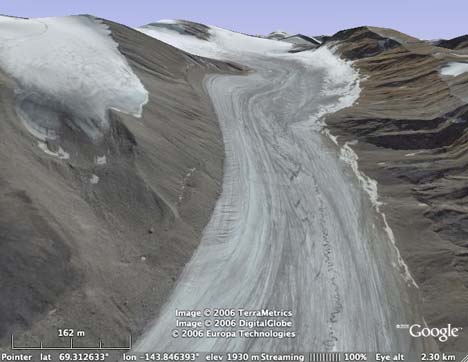
The video sets the bar for how virtual globes can be used as presentation tools. It also shows off nicely the abilities of EarthSLOT, a free virtual globe that Matt developed using Skyline’s TerraExplorer technology, and which he could thus customize with height mesh data that has a higher accuracy than Google Earth’s for the region:
But the video also whets the appetite for how virtual globes could and should be used as presentation tools, because what we really want to do is view such presentations in the virtual globe itself, with a scripted camera, a voiceover track, and layers or objects that load and unload at the appropriate time. Matt’s EarthSLOT has some of this functionality built in — you can download some components of the tour in the middle of this page (though without voice, for example: Matt added that in post-production for the video.)
Soon, conceivably, such a presentation might be delivered via a KML file that plays in Google Earth or a KML-compatible virtual globe. And when you’re done with the presentation, the contents of the KML file would be available as layers for you to explore at your leisure.
Such virtual globe presentation technology would be useful for much more than just science presentations. You could give guided tours of SketchUp houses or city neighborhoods, narrate your travels, or re-enact historical battles.
In November, Google Earth Team’s Jessica Pfund gave a one-hour Google Tech Talk that serves as a great introduction to Google Earth, its user interface and the things you can do with it beyond looking at your house. The talk has now been posted to Google Video. I too learned something: Double right-clicking will zoom you out in Google Earth.
The video is a link worth sending to anyone you know who still hasn’t caught the Google Earth bug (and who has a free hour). (Also, with hindsight, Jessica’s T-shirt was quite a hint about where Google would be acquiring next.) (Via SEO by the Sea)
Another blogger likes the 3DConnexion SpaceNavigator.
If you use iGO navigation software for PocketPC or have a Mio GPS navigation device (both popular in Europe), then you might be interested in a point-of-interest (POI) Editor that lets you drag KML files (among others) to the app and thus to your device.
DestinSharks’ Virgil Zetterlind is kind enough to host Intel’s demo game, Mars Sucks, on his server. Here is his blog post announcing the link. It’ll be up as long as it isn’t popular:-)
Time Magazine’s Wilson Rothman likes 3DConnexion’s SpaceNavigator. But he finds it “annoying” that you can’t use it for anything besides Google Earth. A month ago nobody had even thought of navigating desktop applications in 3D, and now Rothman’s main “complaint” is that he can’t. Still, I guess it’s the kind of frustration you want customers to have.
Remember that bogus website Download-Earth, which misappropriates Richard Treves’ Kokae tutorial screencasts of Google Earth without permission and then tries to get you to click on a paid referral link for Firefox, pretending it’s for Google Earth?
Well now there is another site, Google Earth Tips 360, that has the exact same spiel. Once again, Richard Treves’s screencasts are used without permission, and once again, you are invited to download Google Earth by clicking on a referral link for downloading FireFox.
There are some strange people out there.
Garmin announces that their Training Centersoftware for their sports GPS devices is ready for the Mac, as promised earlier this year. It’ll be available at the MacWorld Expo Jan 8-12, and then as a download later in the month. The app integrates well with Motionbased.com, which already supports the Mac, and which lets you export KML.
Gamasutra has a wonderful exposition of how to make a game using Google Earth as the interface, written by an Intel dev team (I thought they made chips?). The game itself is pretty similar to other scavenger-hunt type games we’ve seen on Google Earth before, but the article breaks the php code into manageable chunks, and provides the source code as well. This should be enough to let any enterprising person make their own geographic quizzes. (Via Digg)
The Washington Post has an interesting article about virtual-world business models. Most of it is about Second Life, but the article also touches about some possible legal implications of the kind of in situ advertising Microsoft Virtual Earth does:
Meanwhile, as mapping technologies rapidly improve, companies are increasingly able to transfer the real world to the online world. But are property rights any clearer in such a “real” virtual world?
Microsoft, for instance, launched an online service last month called Virtual Earth that features highly detailed three-dimensional photographic maps of American cities. Microsoft plans to make money by selling advertising billboards in this virtual depiction of urban America.
But the company’s lawyers and advertising executives are still grappling with the question of whether those who own the property depicted in Microsoft’s 3-D images have any control over how their depicted property is used online. For instance, does Federal Express have the right to object if an ad for its competitor DHL is posted in the parking lot at virtual FedEx Field?
“We haven’t fully delineated all the guidelines for do’s and don’ts,” said Bobby Figueroa, a director of product management at Microsoft.
Swedish tabloids never fail to get a Google Earth story wrong. Aftonbladet a few days ago made a huge deal about how it “revealed” back in April that a secret Swedish spy base was visible on Google Earth. (The story was in fact broken on April 4 by Realtid.se, and carried by Aftonbladet two days later in mangled form.)
Then Aftonbladet claims that a cloud was suddenly found over the base in Google Earth’s imagery the day after its “exposé”. (In actual fact, I still got a snapshot of the base on April 10. It’s the dataset update from April 19 that obscured the base with a cloud, as you can verify here. And there isn’t anything suspicious about this: The immediate result was wider coverage around Stockholm, albeit with a slightly cloudier image.)
Finally, Aftonbladet announces that once again the base is visible — this on an article dated Dec 25, at least two dataset updates after the cloudless base data returned to Google Earth. My own theory is that it was quiet nightshift on Christmas eve, and that somebody on duty was surfing Google Earth until s/he got desperate for a story.
Engadget linked to a system for manipulating 3D shapes called Imaginality Unleased, using nothing more than a webcam and some printed cutouts, by New Zealand’s MindSpace Solutions. it’s free to download and play with, and comes with its own virtual globe demo. (Haven’t tested it, sorry, I’m printer-free.)
Got LabVIEW, that data acquisition and instrument control application, and do you have georeferenced data? In that case, somebody’s already done most of the work to help you visualize that data in Google Earth. Check out this thread.
Google Earth Blog has a reminder that georeferenced Wikipedia articles are also available in languages other than English, just no as a default layer. Get them here.
Wow, Nintendo’s Wii recently got a built-in “weather channel” with forecasts splayed across an actual moving virtual globe. Details here. Note to ESRI ArcGIS Explorer and Microsoft Virtual Earth: Even Wii manages to make the labels face the viewer rather than align with North.
Finally, a quirky article in Germany’s Spiegel Online has their correspondent visiting the Google Earth team at the Google complex and getting an introduction to the application from general manager John Hanke, perceptively described as “the 40-year-old man”. The last part is especially interesting, however: The article accurately describes the differing 3D content strategies of Google and Microsoft, citing the pros and cons of each — if that’s the result of an off-the-record Google debriefing (the analysis isn’t sourced, suddenly), it would be the first clear indication that Google is indeed thinking along these lines.
ESRI released its ArcGIS Explorer (AGX) virtual globe as a Beta a month ago in a soft launch, but I haven’t reviewed it until now because real life got in the way in the form of deadlines and business trips (how time flies!). To make the task a bit more manageable, I’m going to leave a proper look at KML rendering till later, when I also include SkylineGlobe and the upcoming NASA World Wind 1.4 in the comparison.
ESRI has said that AGX is not meant to compete with Google Earth in the geobrowser stakes, but that it exists primarily as a free client to which users of ESRI ArcGIS products can publish their work — a kind of geospatial Acrobat Reader for ArcGIS-produced content. Still, ESRI did include features that are clearly aimed at bridging the gap between purely professional tools and Googlesque edutainment — witness the downloadable Rumsey antique maps, the cloud overlay, solar positioning and support for KML — so I am also going to compare these features with their implementation in Google Earth and NASA World Wind.
Let’s first look at the things I like about ArcGIS Explorer:
Options aplenty
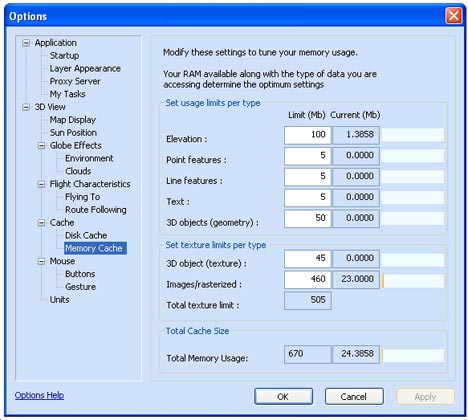
AGX is plenty customizable — including options that are absent in Google Earth. You can (of course) choose your own default server in AGX, but also turn on sun lighting if you like, as well as a cloud layer. You can micromanage your cache, and the globe’s behaviour as you navigate around the poles is yours to choose (though the choice is between sane and are-you-kidding-me). Google Earth does not have sun lighting or clouds by default (NASA World Wind does) but more about those cloud layers in AGX a little bit later.
Some cool tools
There is no doubt about it: The concept of “tasks” — client side analysis tools — is a very cool idea, and shows much promise. ArcGIS users can create tasks, AGX can load them, and then these tools can be made to operate on a dataset in AGX. ESRI includes a few basic ones that are also replicated in Google Earth (find driving directions, measure distances) and one that’s kinda neat and unique: “What’s the address here?” Click on a spot on Earth, and you’ll be told the nearest house address.
Still, I wish ESRI had added a non-trivial task, something that gives us a real taste of what this capability can do. A bit disappointingly, in the weeks since AGX’s release, nobody in the GIS world who blogs that I know of has produced tasks for wide release that show off the promise of AGX’s expandability. Without these, AGX is quite barebones. And after a mouthwatering AGX showcase page, realizing that these functions aren’t actually included with the program is something of a letdown.
3D placemark icons
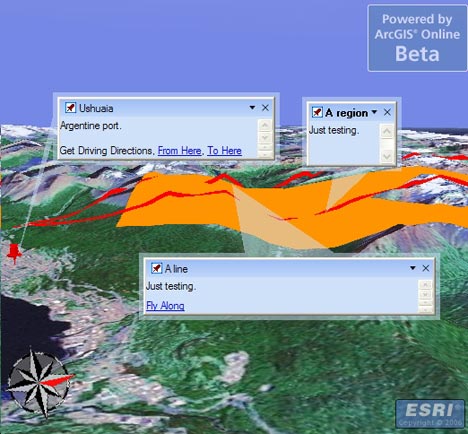
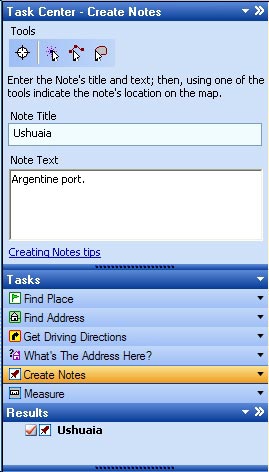
If you choose the “Create Notes” task, you get to create a placemark, line or area and annotate it — though you have to write the note’s title first, and only then do you get to use the tool to make your mark on the map. While this feels backwards to me, once you do create a placemark, you get a real 3D thumbtack back, with real shading, and that’s a nice touch. Also nice is that you can edit these notes inline, and attach files to them, so that architects and town planners have an easy way of organizing documents geospatially.
Not so nice is that if you decide to draw an area, your tool is vector-based, but as soon as you’re finished, the resulting area is converted to a raster image, which proceeds to download, from who-knows-where, s.l.o.w.l.y. W.h.y?
Broad file format support
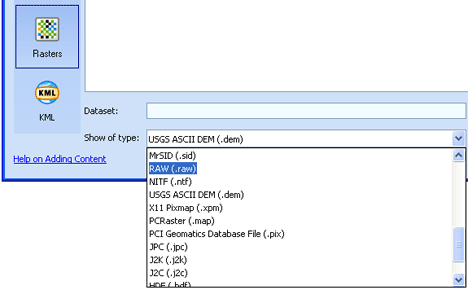
Click on File > Add content, and there are plenty of options — if you have them, you can load tasks, geospatial database files, shapefiles (SHP), heaps of raster file formats (including MrSID) and KML files. If you have access, you can also connect to ArcGIS servers. To open these kinds of files on Google Earth, you need to buy the $400/year Pro version. I’ve only tested the quality of the KML support — more about that below.
You can also open files that are in AGX’s native NMF file format. Like KML, NMF is XML-based, and can describe both layers and notes/placemarks. Unlike KML, NMF can additionally describe tasks and results, so that you can open an entire globe and related tools in one go, like a workspace. Some sample globes are available for download on AGX’s home page.
Again, though, I’ve only seen one “third party” NMF file released into the wild in the weeks I’ve been checking up on AGX, and that was an example posted to the ArcGIS Server Development blog. Without the widespread adoption of the NMF file format by GIS pros there will be less incentive to download AGX, and that’s a vicious cycle, especially as KML is available as a simpler but ubiquitous format.
Now for the dislikes:
It’s slow
Zoom in on a region, and the wait starts. Not only are you downloading the base raster imagery, but raster images of borders and roads as well (if you turn them on), and these often load more slowly than the imagery underneath, so you get an effect like this:
The more you zoom in, the worse it gets, until the server catches up. Again, ESRI says it is not trying to compete with Google’s server farms, but if the open source NASA World Wind can return perfectly respectable imagery within seconds, then why can’t the Microsoft of GIS, ESRI?
Rasterized roads, borders and labels???
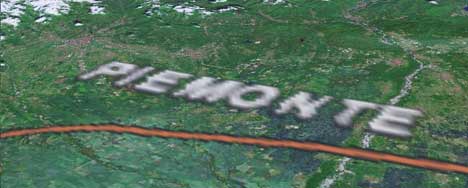
Pardon my punctuation, but I’ve already ranted about this in an initial impression of AGX: Rendering labels as rasterized images just seems bizarre in an age of virtual globes, where you can look at the world from just about any angle — so why maintain the north-up alignment of labels, as if it is a conventional paper map?
James Fee actually found an answer from ESRI regarding this very point. AGX can do both vector-based labels and rasterized labels, it turns out — indeed, labels for KML placemarks opened in AGX are vector-based — but the current globes ESRI supplies use rasterized images by default. The stated reason:
In general, raster labels offer the advantages of better font placement (e.g. stacked labels, angled text on physical features like mountain ranges, better label de-confliction) and better performance where text is dense. Vector labels offer the advantages of rotating and billboarded text when rotating or tilting the globe and sharper labels at some scales.
While I agree with the listed benefits of vector labels, I disagree with the idea that raster labels have any advantage whatsoever, especially if you look at Google’s implementation of vector labels. Check out how Google Earth’s labels deal with crowding:
NASA World Wind and SkylineGlobe also choose vector-based labels, though without the nifty algorithms for prioritizing and shifting, while Microsoft Virtual Earth 3D settles for rasterized text. The upshot for VE3D and AGX is that I get upside down maps on my screen. As a UI-sensitive person, I don’t understand why this isn’t regarded by ESRI and MSFT as an obvious, glaring mistake. But also: How exactly is rasterized text draped across mountain ranges supposed to be easier to read when I’m flying across them? And since when is a rasterized image of text a faster download than the text itself? (I’m assuming that’s what the quote refers to when it mentions “better performance”.)
Usability oversights
I create a note and place it on Japan. I then pan to Hawaii. I right-click on the Japan note in the list of notes in the console to the left of the screen and choose “Zoom”. What does AGX do? It flies to Japan via the Americas, Africa, India and China. Why must the dateline be avoided at all costs? Whatever happened to great circle distances? This is not virtual globe-thinking; this is paper map-thinking, where the world ends at the edge of the paper.
Basic KML features not supported
A KML file containing a collection of placemarks will load and have its icons displayed with vector-based labels, but clicking on the placemarks does not bring up the popup-box and its contents. At first I thought I was doing something wrong, but I’ve tried everything, to no avail. Considering that nearly all the context for a placemark (photos, address, story, link…) is in the pop-up box, this is an oversight that makes most KML placemark collections unusable. Since the bulk of KML content on the web is comprised of placemark collections, this severely limits AGX as a KML viewer for now. There is also no way to disaggregate a KML collection of placemarks. It’s all or nothing. Seriously, did nobody with access to the earlier betas notice this?
Cloud layer is a placeholder
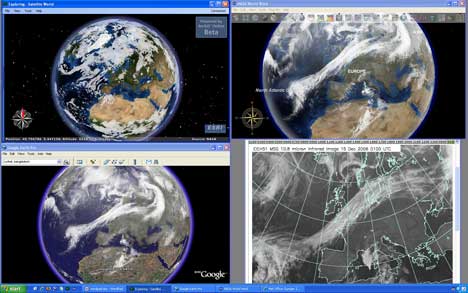
I was comparing cloud layers implementation between NASA World Wind, AGX and a third-party network link for Google Earth, only to notice that while World Wind and Google Earth’s clouds always correlate with each other and an actual live image, AGX just seems to be making it up. I’m guessing the cloud layer you get when you turn this on in AGX is just a placeholder. You have to roll your own weather server if you want clouds, apparently.
Click to enlarge
So, to conclude:
AGX shows promise as a tool for looking at somebody else’s GIS work, but it’s very much in Beta and it shows — a lot of basic functionality is still only half implemented. I don’t want to complain about the lack of compelling high resolution imagery — ArcGIS users are supposed to provide the maps, after all — but the slowness of the downloads of ArcGIS Explorer’s default globes really makes the application a chore to use out of the box.
At this stage, it is difficult to see AGX ever being anything more than a niche player among virtual globes. There’s nothing wrong with that, but after a year of anticipation, fueled in part by comments from ESRI that certainly didn’t disabuse us of the notion they were building a “Google Earth Killer” (for example Jack Dangermond’s comments in June), AGX disappoints. I can only speculate that ESRI’s priorities, after an initial jolt in response to Google Earth’s apparition in June 2005, soon refocused on getting the ArcGIS 9.2 cash cow out the door, and that work on AGX languished as a result.
Jean Thie used the extensive imagery in Google Earth of Canada’s northernmost parts to check in on old research sites from 30 years ago. He points to examples of where permafrost is melting, in the process explaining those strange holes you often see up there. Fascinating stuff.
How has something like this stayed under the radar so long? Ashley Joyce’s GE Chess. You play against others online, make your moves in the browser, and then see the resulting game develop on a big 3D chessboard in Google Earth. Windows only, though. I also wish it would be possible to get network links for games in progress, so we can watch along.
Jogmap.de is a German community site where people can upload GPS tracks of their runs, and download each others’, on Google Earth as well. But why require registration to even just to view runs?
Valery Hronusov, meanwhile, has come out with SuperOverlay Pro ($95), which adds a scheduling application to SuperOverlay, so that new files can be processed regularly. Valery points to Matt Fox’s use of the application to create a superoverlay of US sectional charts (plus 3D airspace polygons) for planes.
Valery also discovered that in Google Calendar, you can put a link to a KML file in the “Where” field of an event, and Google will map it for you in Google Maps.
Jeremy Cothran, who’s been pioneering visualizing sensor webs in Google Earth, wrote a script that converts CSV files into KML. Works either as a Perl script or Windows App. More info here.
Interesting article in Rocky Mountain News about how sensor webs and Google Earth are being used to grow better wine, using a system developed by CH2M Hill.
It is our great pleasure to invite you to participate in the 2nd Annual Virtual Globe Scientific User’s Conference, held as a session within the 5th International Symposium on Digital Earth that will take place in San Francisco 5-9 June 2007.
Digital Earth is a visionary concept, popularized by former US Vice President Al Gore, for the virtual and 3-D representation of the Earth that is spatially referenced and interconnected with digital knowledge archives from around the planet with vast amounts of scientific, natural, and cultural information to describe and understand the Earth, its systems, and human activities. This international vision encompasses the virtual and 3-D representation of the Earth with vast amounts of scientific, natural, and cultural information that is spatially referenced and interconnected with digital knowledge archives from around the planet to describe and understand the Earth, its systems, and human activities.
This ISDE promises to be the highest-profile, non-commercial event highlighting the use of virtual globes in earth sciences and public policy since the virtual globe revolution began. Virtual globes, such as Google Earth, World Wind, and GeoFusion, are leading a paradigm shift in the way that earth sciences are conducted and the way the public perceives the earth, combining science, data management, and outreach into a single, visually-compelling, easy-to-use tool. With dignitaries such as Al Gore present, it seems like an excellent opportunity to raise public awareness and participation in these new technologies.
The virtual globe session will have two parts. First is a series of top-down presentations by invited industry speakers leading the virtual globe development within Google, NASA, ESRI, Microsoft, GeoFusion, and others, following the style of our first users conference and a recent session at the American Geophysical Union. This section will end in a panel discussion. Second is series of presentation by users of these tools, with talks distributed within the 20 or so sessions within ISDE in two broad themes: technology (eg., mobile mapping, interoperability, remote sensing, search engines, 3D rendering) and applications (eg., disaster management, environmental protection, community development, security, conflict resolution, global warming). We will make every effort to not schedule virtual globe talks concurrently between these sessions. Any users of virtual globes are welcome to present here, and no affiliation with university or government is needed.
The deadline for abstracts in January 15, and there is an opportunity to publish in the new peer-reviewed International Journal for Digital Earth. Registration details are described on the web site (www.isde5.org). If you are unsure which theme to submit to, just indicate this and the conveners will schedule you appropriately.
Notes on the political, social and scientific impact of networked digital maps and geospatial imagery, with a special focus on Google Earth.


 There is no doubt about it: The concept of “tasks” — client side analysis tools — is a very cool idea, and shows much promise. ArcGIS users can create tasks, AGX can load them, and then these tools can be made to operate on a dataset in AGX. ESRI includes a few basic ones that are also replicated in Google Earth (find driving directions, measure distances) and one that’s kinda neat and unique: “What’s the address here?” Click on a spot on Earth, and you’ll be told the nearest house address.
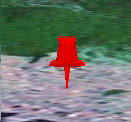 If you choose the “Create Notes” task, you get to create a placemark, line or area and annotate it — though you have to write the note’s title first, and only then do you get to use the tool to make your mark on the map. While this feels backwards to me, once you do create a placemark, you get a real 3D thumbtack back, with real shading, and that’s a nice touch. Also nice is that you can edit these notes inline, and attach files to them, so that architects and town planners have an easy way of organizing documents geospatially.