Afghanistan or Bust? Why choose

New Scientist carries a story today about how some archaeologists are using Google’s aerial imagery as a proxy for an actual excavation because… the site is in Afghanistan, and not exactly safe to visit:

Google Earth’s freely available high-resolution images are helping David Thomas and colleagues at La Trobe University in Melbourne, Australia, to forge ahead with a project called Archaeological Sites of Afghanistan in Google Earth, which catalogues details of 463 potential sites in the Registan desert. These include mounds called tepes – the remains of ancient mud cities – hand-dug underground water channels and villages.

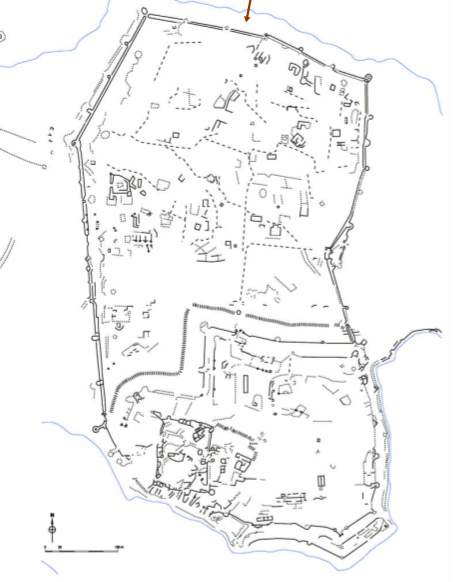
Alas, the article doesn’t show us any of the actual locations covered, but it does point to an interesting conference poster (PDF) made by Thomas and Claudia Zipfel that highlights some of their work on the 10-12th century fortress at Bust on the Helmand river.

bust.jpg

The poster contained enough information to track down the actual location:


View Larger Map

The obvious downside to this kind of archaeology is that you are limited to the bits of Afghanistan that are visible in high resolution.

Links: Radiohead GIS, multitouch OSes, Galaxy Zoo

Ogle Earth is back, or rather back-logged after a lovely European vacation, so here is a first stab at diminishing that field of to-do flags on my screen:

  • Radiohead in Google Earth! Radiohead’s new music video is made entirely from live 3D scanning techniques, with the entire 3D dataset available for further tinkering. And tinkering is what The Swordpress does, producing a totally awesome face of Thom Yorke hovering over Google Earth as a KML file:

    (KML file here.) I hope more tinkering is coming — an obvious request is to use KML’s timeline support to animate Thom in Google Earth, though there is real risk of this precipitating a geek singularity.

  • Multitouch Mac and PCs: When will we be able to zoom out of Google Earth simply by pinching a trackpad or multi-touch aware surface? For OS X, the framework will be in place with the next release of OS X, dubbed Snow Leopard, reports Apple Insider. Microsoft is putting the capability into Vista’s successor, Windows 7. Both OS releases are slated for 2009 — will this be the next great revolution in the mainstream UI? In a sense, it’s already here with the iPhone, which has an additional ability to use its built-in accelerometer as input, but some of the coolest stuff you can’t do yet because iPhones have battery and screen constraints.
  • Mobile Google Earth? If you watch the question-and-answer session at the end of Google Geo team CTO Michael Jones’s presentation at Google I/O on May 28 2008, you’ll learn that there is a will to create a mobile version of Google Earth, but that the timing will depend on when mobile devices become good enough to provide sufficient GPU power without draining batteries.

    So it is a question of when, not if. But if you had to bet on which mobile OSes will get this functionality, which would they be? My money is on Android (Google’s own) and iPhone (based on Mac OS X, for which a version already exists.) What about Nokia’s open-source Symbian, Microsoft’s Windows Mobile and RIM’s Blackberry OS? Will these be served by browser-based virtual Earths? Will Virtual Earth get a mobile version, and will it run on just Windows Mobile?

  • While I was away: Google Earth got a minor update, ArcGIS Explorer got a substantial update (version 480, gaining GeoRSS support), and Google Earth’s dataset got an update (especially in Australia).
  • Clickable countries: Over at Aid Worker Daily, Jonathan Thompson makes the case for “clickable countries”for Google Earth, the ability to restrict your mapping dataset to just your immediate environment, to help cope with restricted or high-cost bandwidth in developing countries, especially during disasters. An interesting idea. I’m just afraid that if it gets implemented, countries with governments that are averse to the open society will take Google to court with a view to having their country “unclicked”.
  • Google Sky hearts Galaxy Zoo: Galaxy Zoo (blogged here) is an astronomical mechanical turk for sorting galaxies. It has already paid off in the form of the discovery of a very unique and strange object (“voorwerp”) that defies all classification, as reported in ScienceNews last month (part 1 and part 2). Now Google has given the project a $50,000 grant to incorporate Galaxy Zoo into Google Sky and add Google Sky features to Galaxy Zoo. Galaxy Zoo 2 is also under development.

In case you were wondering how my (forced) cloud-based productivity test went: I’ve been made all-too painfully aware over the past several weeks why I need a MacBook Pro and not just any old computer with a browser in an internet café. Moore’s law rocks, and may it continue to hold for a long time coming.

Three ways to make your Mac more location-savvy

Several new system-level tools have come out during the past month that enhance the Mac’s savviness in dealing with GIS- and georeferenced files.

GISLook & GISMeta: If you use Mac OS X 10.5 then you’re probably hooked on Cover Flow and especially Quick Look, two very fast ways of previewing the contents of files. Not all file formats are supported natively, however. GISLook & GISMeta is a free (donationware) utility that adds support for Shapefiles, ArcInfo files and a whole range of raster grid filetypes, including USGS DEM files. Install it, and suddenly Shapefiles will look like this on the Mac, with no further effort on your part:
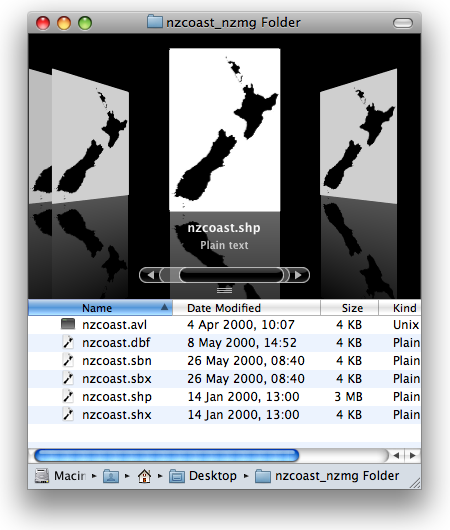
shapefileinosx.png

Quick Look works similarly. Installing this is a no-brainer.

GPS-Info CMM 1.1: This contextual-menu tool lets you do all sorts of things with images that have location coordinates embedded in their EXIF metadata. Version 1.0 was reviewed back in May, but now version 1.1 carries a set a new features. Developer Norbert M. Doerner lists them:

  • The IPTC fields city, state, and country are being displayed, if they are contained in the photo
  • The Reveal in Google Earth command now “flies” Google Earth to the GPS coordinate, and also uses the tilt, azimuth, and distance embedded in the photo for the display
  • The GPS coordinate can now also be exported into a KML file
  • Added SmugMug and WikiMapia to the list
  • Google Maps now sets a marker with the name of the photo on the exact GPS location

Supporting tilt and azimuth settings is definitely beyond the call of duty.

GPS2Aperture: I’ve been waiting for a tool that lets me set or edit the location coordinates of the EXIF metadata of master image files in Apple’s Aperture library. Until now, the conventional wisdom has been that it’s not possible, as Aperture’s API doesn’t allow altering master images by outside applications. GPS2Aperture takes a different tack, making judicious use of OS X’s built-in scripting tools, and suddenly you can edit EXIF data, setting the location to your view in Google Earth. GPS2Aperture is free, beta, and looks like this:
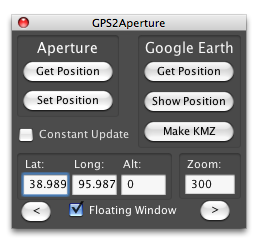
gps2aperture.png

A paid premium version is underway which will let you automatically tag photos from GPS log files — much like HoudahGeo and GPS Photo Linker, but with the added bonus that you can do it within Aperture. (Note, GPS2Aperture is not an Aperture plugin but a separate small application.)