Sentinel AVE: Fuse live streaming videos to the 3D landscape (!)

Back in April 2006, Ogle Earth flagged GeoDec, a research project by grad students at the University of Southern California that allowed you to project live video streams onto a 3D landscape. The research had support from both Google and Microsoft, and came with an eye-popping video of what the future held.

logoNew.jpgThe future is now. GeoDec’s demo site is gone, but out of its ashes comes Sentinel AVE, a company, and Augmented Virtual Earth (AVE), their product. USC’s researchers have turned their project into a business. And good for them.

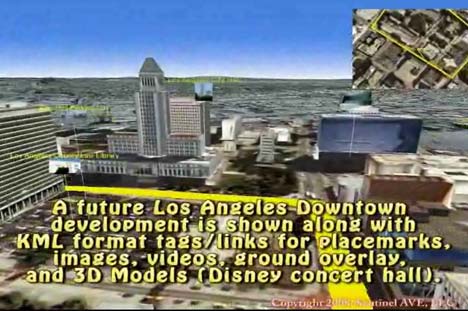
As told by this impressive video demo, AVE is a fully fledged virtual globe with 3D DEMs, textured urban buildings, accurate sun positioning and support for KML as well as buildings taken from Google’s 3D Warehouse. But the single most impressive feature is the seemingly scalable ability to “fuse” any number of streaming videos to the landscape, so that surveillance cameras can collectively paint a a whole region in live 3D video.
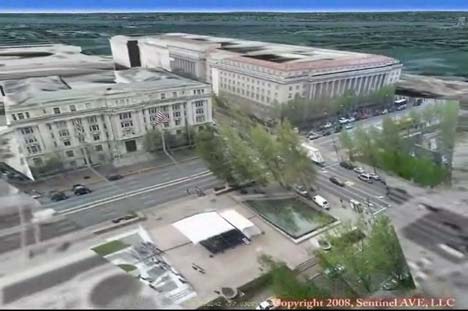
sentinel1.jpg

sentinel2.jpg

That’s a first. Yes, Second Life has the ability to show a video in-world onto a screen, but an avatar can only see one at any one time. SkylineGlobe also lets you add 2D video clips in their globe, but you can’t distort the projection so that it fits around a 3D object, like AVE does. Sentinel AVE seems to have cracked the scalability issue, something which their video says involves a patent pending method. According to them, AVE runs on current laptops (though I’m guessing it’s Windows only).

If you visit Sentinel AVE’s about page there is no doubt that much of their original backing is (US) military in nature. But the video’s virtual visit of the Googleplex and the seamless integration with Google’s 3D Warehouse hints at some collaboration with Google’s geo team.

If you want to buy Augmented Virtual Earth, you need to send them an email. If you have to ask how much it costs, though, you probably can’t afford it, and that’s probably because you’re not the military, a city or big company wanting 3D video surveillance of a region. Still, today’s cool new technologies are tomorrow’s Google acquisitions, right?:-)

Five years from now, we may all be pointing our webcams out the window, contributing to a global live 3D video mosaic open to all. Then Google Earth (or a live video version of Microsoft’s Photosynth in Virtual Earth) would do to surveillance what it did to remote sensing intelligence gathering — bring it to the masses, replacing big brother with millions of little brothers. (Via Diserto)
Links: Ipoki + Qik = georeferenced mobile phone video webcasting

  • Finally! Live georeferenced mobile phone web video: Live mobile phone video streaming site Qik and live GPS phone position site Ipoki have collaborated to let you live stream video from your mobile phone to the web while also showing your location in real time. Here’s the obligatory YouTube showing it off:

    This is the first instance I am aware of where you can publish live georeferenced video to the web from your mobile phone. (Seero lets you do it from your GPS enabled laptop with video camera.)

  • Where is Captain Bill? Virgil Zetterlind of EarthNC writes:

    Captain Bill Foster and EarthNC have partnered to live-cast the delivery of a 46′ cruiser from New Buffalo, Michigan to Marco Island, Florida starting today the 22nd of July. Capt Foster and his crew are presently in the Chicago area and will begin to traverse the city via the Chicago River at approximately 2pm EDT this afternoon.

    Via cell-phone aircard, Capt Foster is uploading his position and a webcam image approximately once per minute to EarthNC.com. You can watch his track in Google Maps and Google Earth and see his latest photos here. His position and images will automatically update so long as he has an available cell data connection

  • One Man Resting: A few days ago Craig Stanton finished his walk across Japan, which he documented on georeferenced video using Seero.
  • Near real-time aerial imagery? Perhaps the most-heard complaint about the free aerial and satellite imagery in Google Earth and Virtual Earth is that it sometimes is a few years old. If an Australian company gets its way, this may soon change. From an ITWire article:

    According to [Perth-based] Ipernica, “NearMap’s technology enables very high resolution aerial photomaps with multiple angle views to be created at a fraction of the cost of traditional solutions… For the first time, people will be able to see the environment change over time, as NearMap’s online photomaps allow users to move back and forward month by month to see changes occur, such as the construction of a home or development of a new road. [And] with NearMap’s revolutionary approach to high resolution photomaps, it has achieved its objective of a 20-fold operating cost reduction over current industry practices.”

    Panning not just through the X and Y axes but also through time would definitely be cool. Let’s just hope it’s as scalable as advertised. There’s more details in the ITWire article.

  • Afghan archaeology redux: The Sydney Morning Herald has an article on David Thomas’s use of Google Earth to map Afghan archaeological sites, and it comes with another fine aerial shot of a Ghaznavid fortress in the Registan desert. This one I couldn’t locate at all, however. Does anyone else have any better luck?
  • Virtual Earth update (including Berlin): Lots of new imagery for Virtual Earth, especially for Europe, and including bird’s eye imagery for all of Berlin, where I happen to be summering. Check out that architectural wonder of an airport, Tempelhof, smack in the middle of the city, to which I walked a few weeks ago to take a flight. That very same day was also the 60th anniversary of the start of the Berlin Airlift. I made a small portfolio of photos on Flickr of Tempelhof, as the airport is slated to close soon. (PS, looks like I still can’t embed Virtual Earth maps on a web page, or I would have done so here instead of giving you a URL to the airport.) See comments.

  • QSL2KML: Amateur radio operators use QSLs as a way of confirming reception of a broadcast in faraway places. As they are by nature georeferenced, they’d make a great KML file. And that is precisely what KML My QSLSs does, for free.
  • Geonames unplugged: The Map Room points to a 1930s globe “with a complete index and gazetteer inside it.” Just in case we start to take Geonames for granted.
  • Satellite imagery primer: Discover Magazine on the rise of ubiquitous free satellite and aerial imagery on the internet. Interesting primer on much of what this blog has covered the past three years. One excerpt makes an ironic point:

    Indeed, while the U.S. government prohibits sale of satellite imagery with ground resolution better than a half-meter [of the US by US-based companies], no such rule applies to images from nonsatellite sources. So while a satellite company may be forced to “fuzz up” an image of, say, CIA headquarters in McLean, Virginia, to meet the half-meter standard, that same picture is available in even sharper focus from aerial photographs on Google Earth.

    In the rest of the world, the situation is the other way round. US satellites can take as much imagery as they want from space (with the sole exception of Israel and the Palestinian Territories), but aerial photography — such as that of the Netherlands used in Google Earth — is subject to censorship by the sovereign power because it is taken from the national airspace. (Via All Points Blog)

HeyWhatsThat visualization tools for August 1 solar eclipse

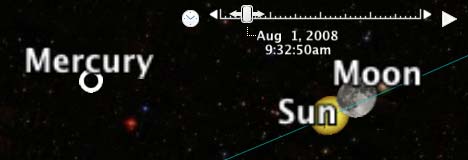
aug1eclipse.jpg

Michael Kosowsky of HeyWhatsThat writes:

I’ve enhanced HeyWhatsThat‘s astronomical sites for the August 1 total solar eclipse [over Siberia]. By using topocentric rather than geocentric place for the Moon and interpolating planetary positions, the images now better match what I’d guess is the gold standard: NASA’s Solar Eclipse Web Site (If you’re going to spend time or money traveling to see the eclipse, please use their numbers, not mine.)

The planisphere:

The cosmic visibility site:

  • Visit the site and you can see a simulation of the eclipse in your browser, again for either your own location or the eclipse maximum in Siberia. Just click on one of the “August solar eclipse” links under “interesting events”.

As of this writing the “Earth” tab doesn’t show the path of the Moon’s shadow, but the NASA site does a great job of that here. Be sure to click on their map to get the eclipse circumstances for any location.

With the new Google Earth API — the ability to put Google Earth inside a web browser and control it programmatically — I hope to merge a lot of the planisphere and cosmic functionality into a single site… but probably not before the eclipse.

Google Earth Blog also has an entry with a KML link to the path of totality for the eclipse.

Second Life map of Sweden

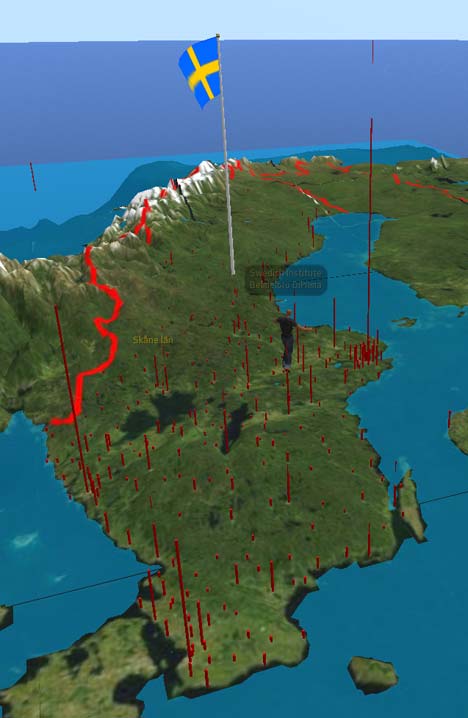
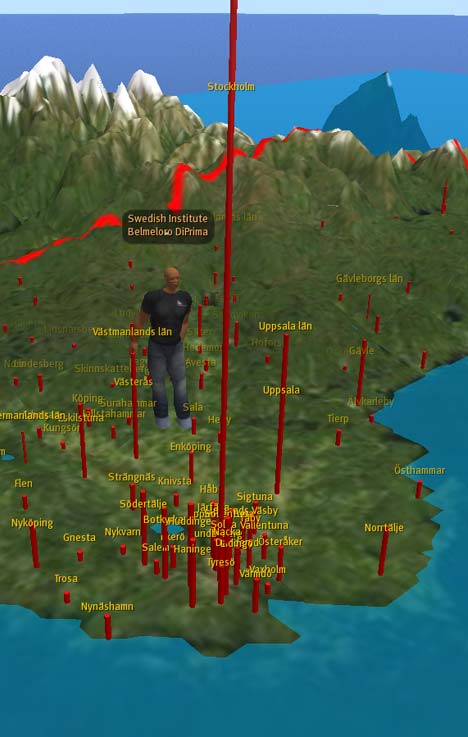
Swedish programming virtuoso Magnus Zeisig as just published an accurate 3D map of Sweden in Second Life that can be scripted to show all kinds of data and run all sorts of animations. You can visit it in Second Life here, and it looks like this:

SLsweden.jpg

SLsweden2.jpg

SLsweden3.jpg

How did he make it? Magnus writes:

Topography data were processed using PERL programs of own design. Topography data and geographic data were conically projected using the program DAZ/Eovia Carrara. Population and area data were processed using Microsoft Excel and Visual Basic programs of own design. Final topographic sculpt, geographic and heraldic images were prepared using Adobe Photoshop.

Magnus used Second Life’s sculpted prims to build the landscape, and on top of it you can today turn on/off “layers” with city names and cylinders that represent population, which is done using the Linden Scripting Language. (When you visit, click on the map for animation options and more info.)

Magnus has more in store, including a search function and animations for ship and rail traffic. It certainly not as easy as making a quick and dirty KML file for Google Earth, and no doubt takes more work than building something with the new Google Earth API, but when it comes to programming an interactive 3D map to measure, this example shows it’s certainly feasible in the versatile 3D programmable space that is Second Life. (Previously on Ogle Earth: Magnus’s planetarium in Second Life)

Links: OneGeology, TOAST, SatBeams, HeyWhatsThat mobile

  • OneGeology: One obvious map for an Earth atlas to show is the planet’s geology. Enter OneGeology:

    OneGeology is an international initiative of the geological surveys of the world and a flagship project of the ‘International Year of Planet Earth’. Its aim is to create dynamic geological map data of the world available via the web.

    The result so far is a dynamic map accessible via the OneGeology Portal which unfortunately I could not visit as the only supported browsers are IE6, IE7 and Firefox 2. I run Firefox 3. But Italian GIS blog Tanto, via which I heard about OneGeology, has a promising screenshot of the growing map. Fodder for Google eventually? Not sure what ads could be placed against a geology layer — pet rocks? :-)

  • How WorldWide Telescope works: Jon Udell has a fantastic two-part series on the making of Microsoft WorldWide telescope, interviewing developers Curtis Wong and Roy Gould in part 1, and Jonathan Fay in part 2. In this second part, we hear all about TOAST, “tesselated octahedral adaptive subdivision transform”, a projection system they developed for spherical models that does not fail at the poles (unlike Google Sky). The whole series is deliciously detailed in a geeky way. (Via Jon Udell)
  • Social satellite coverage maps: Alexander from SatBeams writes:

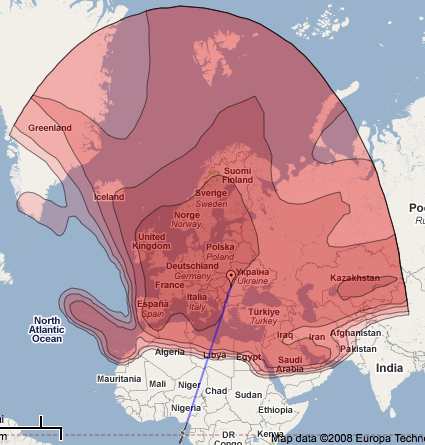
    I have recently started a new website – SatBeams. The site allows to view the Satellite Coverage maps for most of the satellites all over the globe in Google Maps format. At the same time it is possible to place markers on the map stating which frequencies/channels one can receive at the specific location and view what others can receive from the selected satellite in different places of the world.

    The coverage maps are very pretty indeed:

    satbeams.jpg

  • HeyWhatsThat goes mobile: geoprogramming tour de force HeyWhatsThat is now available on GPS-enabled mobiles, including the iPhone, Blackberry and Nokia as part of the Where GPS widget collection and also for Android. Want to know what those peaks on the horizon are while you’re on your trek? HeyWhatsThat will tell you… as long as you’re within cellphone range, of course. Interesting datapoint regarding the iPhone’s popularity, courtesy of a news email from HeyWhatsThat founder Michael Kosowksy:

    Computation requests [for your view] are put in a queue, and because of iPhone-related demand, for the last few days the “two minute” calculation estimate has been as high as fifteen minutes. (If it goes above fifteen minutes, we just ask you to try again later.) But please note that once you start a computation you don’t have to wait for it to finish; you can leave the screen and simply come back later via the menu entry “Show me a view I’ve requested before.”

  • More of Sweden in 3D: Stockholm went 3D in the browser on Hitta.se in May (blogged here) — now it’s the turn of Göteborg, Linköping and Malmö. (Possible problems in Firefox 3, works in Safari on Mac) (Via NyTeknik)
  • Nostalgia trip: Just in case you read Swedish, Dagens Nyheter has an article about how an Iranian refugee in Sweden who was forced to leave his country in 1983, can now, 25 years later, visit his ancestral village of Kalajah virtually via Google Earth. Once again a newspaper fails to do the obvious and embed a dynamic map of the place, so here you go:


    View Larger Map

    Gives a new poignant meaning to “looking for one’s house”.

  • “Clickable” DVDs: When it comes to aid workers working in low-bandwidth countries, instead of “clickable countriesRichard Treves suggests putting all the required data into regions-based KML sticking it on a DVD. One downside of this: Information on the DVD is static, though you can completely eschew the need for an internet connection.
  • Google Earth tutorial: Also from Richard Treves: Producing Maps with Google Earth, a new web tutorial for Google Earth that he’s made for the University of Southampton’s School of Geography.
  • Highlands in 3D: Paul Webster from WalkHighlands.co.uk writes:

    We’ve been integrating walkhighlands.co.uk website more completely with the Earth plugin/API. You can now open the 3D Highlands above the current walk from any of our walking route descriptions. And you can open the first person view from any of our pages on the mountain summits (known as Munros in Scotland) e.g. from www.walkhighlands.co.uk/munros/sgurr-nan-gillean . At any point using the plugin you can now switch between first person mode and controls so you can walk and look around about in the virtual landscape, and an overhead view with the standard controls.

Links: Watch ice melt, DeepPhoto, NOAA coastal charts

  • Arctic Melt: Ross Swick of the US National Snow and Ice Data Center writes:

    With just a little over two months until the Arctic sea ice minimum I’ve put together a new animation for Google Earth. I’ve created an animation of Arctic sea ice concentration for the last 60 days which will be updated daily. The idea is folks can watch the arctic melt as it’s happening this summer.

    Very cool. Download page is here (first in the list). Ross stresses that the animation is still in beta for another week or so, and that he’s appreciate any suggestions for improvements. If the Northwest passage opens up this summer, you’ll be able to check for yourself.

  • DeepPhoto: I haven’t seen this distributed widely, so be sure to watch the video below about how Microsoft has been using geospatial technologies to enhance photographs. You know how when you see FBI types enhance photos in outlandish ways on CSI or Law and Order and you go “that’s not possible?” I had that same impulse while watching this video, except that here it is very possible. If you want to know what kind of plugins you will be getting for Photoshop CS5, click play…

    Video: Virtual Earth Demo at Microsoft Pro Photo Summit – LiveSide.net

    (Via D’Technology Weblog)

  • YA3DGE: Jonathan Thompson of Humanlink writes:

    I spent the weekend at O’Reilly’s FooCamp in Sebastopol, CA. One of the items demo’d was a screen treated with a 3D laminate. We were controlling Google Earth with a SpaceNavigator. We all had 3D glasses on; a ddd.com driver was used to do the split. I am pretty sure Damien [Stolarz] was the individual I was speaking to and I just noticed his write-up here.

  • iPhone location-aware apps: I wanted to get an iPhone just so I could write a post on location-aware apps, but unfortunately I can’t just buy one where I happen to be and drop in a sim card (how I hate phone locking!). Fortunately, Brady Forrest on O’Reilly Radar has gone and written that very post.
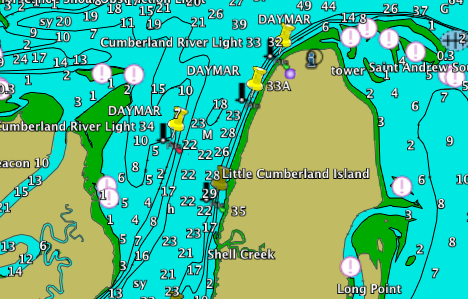
  • NOAA coastal charts: Bill Zissimopoulos of Navimatics writes:

    I have developed a set of marine maps for the US coastline derived from NOAA’s Electronic Navigation Charts, which is viewable in Google Earth. I am wondering if you have the time and interest to review them for your blog. My website is here. The online charts can be accessed here.

    The service is free, and the network link works fine:

noaachart.png