Google Earth: Atlas or mirror world?

Frank at Google Earth Blog is already doing an excellent job looking at and explaining the new features of Google Earth, and so is Google Lat-Long blog, so no need for duplicate posting here. What you’ll find instead is some more esoteric observations, ranging from the philosophical to the mundane.

The philosophical:

It occurs to me that the individual improvements that comprise this latest revamp fall into two categories — let’s call them brains and beauty. I get a lot more excited about the improvements to the brains of Google Earth, though I realize that it’s beauty wich turns heads, and which people “want” (or “cling” to ;-).

How to define those two categories? Brainy improvements improve the quality of the information that Google Earth delivers, or improve the efficiency of access to existing information — they improve the function of Google Earth as an atlas. Beauty improvements, on the other hand, improve the function of Google Earth as a plausible mirror world, an ever-more accurate simulacrum of Earth.

Atlas or mirror world, what’s the difference? Their functions are in fact poles apart. Atlases filter out as much as possible that which is not information or which obscures information. Mirror worlds, on the other hand, aim for the accents and details that provide a sheen of reality — precisely that which atlases strip off in the pursuit of clarity. Atlases try to augment reality by pushing high-information content to the fore. Mirror worlds do not.

These two functions can conflict if they exist in one application, and indeed I feel Google Earth is acquiring something of a split personality with this release. I’m not really complaining; you can turn off many of the improvements that are propelling Google Earth to its mirror-world destiny, but it is still the case that resources are being expended by the team on making Google Earth pretty, sometimes even at the expense of clarity.

I’ll explain, but I’ll start by categorizing the most recent release’s improvements into brains and beauty:

Brains:

Revamped navigation controls

easily viewable acquisition dates

Street View in Google Earth

12 new languages

Flash support for Mac

Beauty:

More and better buildings

New sunlight control

New atmosphere

I think most of the brainy improvements are uncontroversially brainy, but why do I regard the new buildings and the new sunlight controls as cosmetic? Let’s take each in turn:

More and better buildings: It’s true that the rendering of 3D buildings is now much more efficient, and that there are a lot more of them, but why doesn’t this constitute a huge informational boost? Because the satellite imagery already tells us there are buildings in those places; there is precious little else added by a 3D representation without metadata such as: Are the buildings residential, office, factory? Who owns them, when were they built, how high, who built them, how much was paid for them, what businesses are inside? Do they have websites, do they deliver?

A lot of this no doubt will arrive down the line, but until then, the buildings are pretty rather than informationally dense.

New sunlight control: When NASA World Wind got a feature just like this last year, I remember biting my tongue lest my critique be seen as partisan, but I did not really regard that functionality to be something that increased the informational quotient of World Wind much; I feel the same criticism now holds for the implementation in Google Earth.

The sunlight control is useful in one specific way — to see where on Earth it is night and day at a specific hour. But when it comes to lighting landscapes and buildings at sunrise or sunset, I don’t see the value besides eye-candy appeal.

First of all, the sunlight control is a bit of a misnomer. We’re not actually seeing the effect of sunlight: Buildings and mountain peaks do not generate actual shadows on neighbors when the sun hangs low on the horizon. Instead, we get shading as an inverse function of how much a surface faces a light source we’ll call the Sun.

Shouldn’t I be happy that Google Earth isn’t going all out for realistic shadows but instead is giving us a shading tool, which we can use to tease out terrain features? I would be if the light source were movable to ad hoc locations other than where the sun can be — for example, if I could make it revolve around the sky at 10 degrees above the horizon at locations other than the North Pole currently, I’d be happy, indeed. (Do go to the North Pole and try it, though. I really works, there.)

What I’m trying to say is that the current implementation falls between two chairs. It’s not quite accurate in terms of mirror worldliness, but is still limited in scope by its mirror-world aspirations.

New atmosphere: One place where I know I disagree with Google Earth Blog’s Frank Taylor is that I like to be able to see the little rectangular strips of high resolution imagery across the face of Google Earth when zoomed out, whereas Frank would prefer the look to be seamless and realistic, and prefers the zoomed out Google Earth to look just like the real thing.

For me, however, those rectangular strips represent information. They promise a lot more information if I zoom in on them, and also hint that there’s something there worth taking a high-resolution image of. I feel that this kind of information should trump a realistic view of Earth. And while the new atmospheric look certainly helps with the realism, it filters out too much of the kind of detail that I feel makes Google Earth useful when zoomed out. Yes, you can turn it off, but it’s turned on by default. I feel version 4.2’s atmosphere had a much better information/realism balance.

Priorities:

So what would I have prioritized instead of buildings, sunlight and a thicker atmosphere? Well: A projection that is friendly towards the poles; 3D bathymetry; better tour creation support; GeoRSS support; better search filters. These functions would all tilt Google Earth back towards the atlas end of the spectrum. Of course, that’s not necessarily where the money is. Google Earth is ad-supported, and nobody searches for pizza at the poles or in the Mariana Trench. And when Microsoft Virtual Earth does things like add lots of new buildings and everyone applauds, it’s hard not to want to compete. But that’s okay; in the end I much prefer a free mirror world with atlas functions than nothing at all.

That’s all the philosophy I can muster tonight. Now for the mundane stuff.

The mundane stuff:

Bear in mind that this latest version is still beta, so some stuff doesn’t work well. On the Mac, I’ve found the keyboard controls to sometimes lock up, even on a new install on a new account. If you’re using GE for a must-succeed presentation, best to stick to what you know works.

Another reason to ease into the new version is that the keyboard controls have changed. [On the Mac,] Command + up-arrow or down-arrow previously let you zoom in and out, but have now been mapped to the new look-around control. Zooming is now linked to the function + arrows combo. It takes some getting used to, unless of course you use the on-screen controls or a SpaceNavigator.

There’s one new preference item: You can turn off the new auto tilting feature that you get by default as you zoom in by right-clicking and drag the mouse up/down or using the on-screen controls.

Another subtle change: You can no longer filter the default layers by Core/All/Active layers only. Considering that it was a little-used feature that could generate confusion, this simplification of the UI is welcome.

One thing I think is a bit of a loss: No longer do we get a precise percent figure in the status bar showing how far along the download of current view’s imagery is. Now it’s a growing circular arc that slowly grows into a completed circle. Frustratingly, the arc sometimes gets smaller!

Turn on layers or placemarks in Google Earth, switch to Google Sky and you still get to see that content, floating among the stars. Surely this bug can’t be that hard to fix?

Small gripes, really. To be honest, I’m having way too much fun watching and waiting for the next move in the Iran-Google war of wills. It sure helps that Google has little or no business interests Iran, and that it still has a lovely concession up its sleeve: Offering to make a localized Farsi version that omits the Arabian Gulf reference, in accordance with their “primary, common local” doctrine. (Just don’t call Farsi Farsi:-)
Links: GE 4.3 out, Landprint.com, VE 6.1, KML => OGC

I have been (and still am) traveling, so have had to peck at the news in a busy news week. Here’s some of the stuff I’ve had to give short shrift recently (fortunately others have not):

  • Google Earth 4.3 coming online: Download it now. While you’re waiting, read Google Earth Blog’s first impressions.
  • Landprint.com: Order your own 3D custom-made prints of bits of the planet. $50 + shipping gets you 6×6 inches of a 3D relief-map. By a developer of NASA World Wind. Very clever.
  • Satellites over Iran: UK’s The Times has a story about a purported Iranian long-range missile factory. With photos. A blogger goes looking for the spot in Google Earth and makes the before/after analyisis.
  • Virtual Earth 6.1 released: Microsoft has revamped its map and virtual globe offering, to general acclaim. Digital Earth Blog likes the trees and overpasses. James Fee notes that Mac Safari web browser support means Virtual Earth is now in play for more projects with tough browser compatibility requirements. Mapperz shows how you can overlay ESRI Shapefile data in Virtual Earth. Leave it to me to point out there is still no Mac support for the 3D component, which makes the clickable but useless “3D” button that is prominent on Mac browsers doubly irritating.
  • KML accepted by OGC as a standard: Google Lat-Long breaks the news. Upshot: Broader adoption, slower development, and not a surprise. Matt Giger doesn’t like the part about the slower development, while some GIS pros scoff at the idea of KML as the geospatial HTML. The Daily ACK muses on making KML a standard for the visual display of astronomical data as well.

Would Persiarabian Gulf work for everyone?

Here’s a further sign of the slowly shifting power balance, away from nation-states to non-state actors: Iran’s foreign ministry has now taken it upon itself to censure Google Earth’s use of the term “Arabian Gulf” alongside “Persian Gulf”:

“Raising such issues about a historically-documented and undeniable term is illegal,” [foreign ministry spokesman Mohammad-Ali] Hosseini told the Mehr News Agency.

The Islamic Iran Participation Party also condemned the move, saying it will raise suspicion that Google Earth managers and experts are “knowingly or unknowingly” following certain power’s efforts to provoke conflict in the Persian Gulf region.

In a declaration released on Monday, the party described the action as insulting the intelligence of the international community.

This is undoubtedly the next volley in this escalating war of wills, after Google posted its “primary, common, local” naming doctrine to its public policy blog. Without mentioning that particular gulf, the doctrine spells out precisely why the term “Arabian Gulf” isn’t going to be removed anytime soon: It’s the primary common local name for the Gulf in several countries bordering it.

Google Earth 4.3 out today

It’s midnight in Mountain View, so the embargo’s over: There’s a new version of Google Earth coming out today, Google Earth 4.3, though it won’t actually hit Google’s download servers until 8pm local time (00:01 03:00 UTC Wednesday morning.) In the meantime, briefly, here’s what to expect, as recounted by Google Earth product manager Peter Birch:

Revamped navigation: New users should find it much easier to get around Google Earth. Zoom in and the view automatically tilts to horizontal, and there is a new look-around control. (Also, relative height is now used to determine movement speed, not absolute height.)

Images get easily viewable acquisition dates: Move the pointer over a piece of high resolution imagery, see the acquisition date at the bottom of the screen.

More and better buildings: 3D rendering has been rethought — low res versions of textures download first, followed by higher res (which is more like how Microsoft Virtual Earth does it, from the sound of it). There’s whole new towns available by default, and many more Google Earth Warehouse buildings.

Flash support for Mac: Finally, we once again have feature parity for Windows and Mac versions. This means YouTube videos are now viewable in Mac version of Google Earth. Yay!

Street View comes to Google Earth.

New sunlight control: When turned on, see where it is day and night on Earth, using the time slider. Zoomed in, watch the sun rise or set over the landscape. (There will likely be comparisons made to this feature in NASA World Wind, not least by World Wind developers themselves :-)

12 new languages: Google Earth will now also be available in Swedish, Danish, Norwegian (isn’t that just a Swedish dialect? :-), English(UK), Spanish (Latin American), Finnish, Hebrew, Indonesian, Portuguese(PT), Romanian, Thai, and Turkish.

What’s “missing” from this release? Of the most requested features, there will not (yet?) be revamped support for tours, no new pole-friendly projection, no 3D bathymetry and no GeoRSS support. Google Earth joins Microsoft’s Virtual Earth in getting a revamp, so perhaps it’s high time for a head-to-head review…

Programming planetariums in Second Life

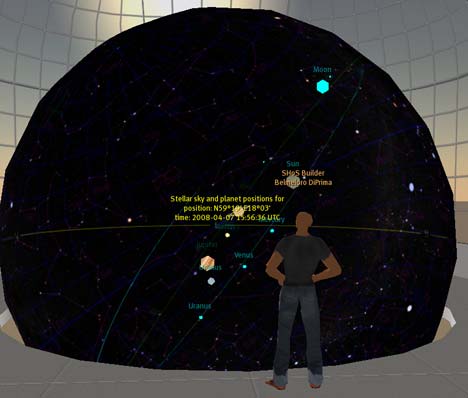
Second Life is not a dedicated virtual globe or virtual planetarium but a free-form three-dimensional programmable space that anyone can use to build globes and planetariums in. One impressive recent example is the virtual planetariums built by Magnus Zeisig, one of Sweden’s most talented SL programmers.

planet1.jpg

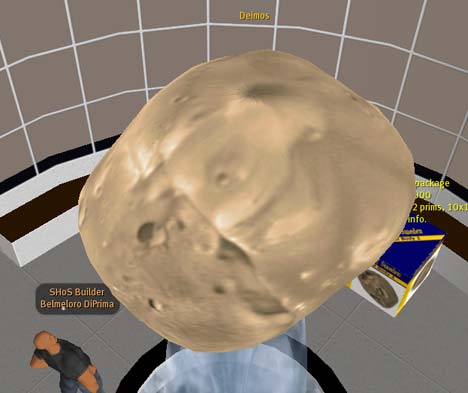
If you visit his space in Second Life, you get to walk around and through a number of exhibitions, including an programmable orrery, walk-through 3D maps of nearby stars and galaxy clusters, and a 3D browsable database of planets, satellite and asteroids — even those with weird shapes like Phobos and Deimos.

deim.jpg

Navigating through these exhibits in 3D with an avatar gives a real sense of depth and distance — its an original and unusual perspective on these datasets.

galax.jpg

Magnus writes that he will be collaborating with the International Astronomical Union for the International Year of Astronomy in 2009, and he’s also been commissioned to build a larger version of his work for an American university. You can read more about what Magnus has been up to in a PDF newsletter (in English) where he explains his project in his own words. This being Second Life, you can of course buy your own copies of Magnus’s planetariums, and set them up in your virtual Second Life pad.

planet2.jpg

Trailguru

Tim Parks writes in about Trailguru, a GPS route sharing site with an innovative approach to scalable viewing in Google Earth. It’s another post that practically writes itself:

I thought I would write and let you know about an internet project I am working on called Trailguru to make discovering and sharing route information easier by blending Google Earth, Google Maps, Wiki, and GPS technology. First off, TrailGuru enables you to visualize your exploits in Google Earth / Google Maps. For an example, have a look at a track I captured on a trek I did in Ladakh in Northern India.

By sharing your track, Trailguru also integrates it into the trail maps on the site that are accessible from Google Maps or Google Earth. For example, you can add trail maps to Google Maps by adding our mapplet.

Finally, the end goal of TrailGuru is to share route information and you can also create and share a routes from the captured trails on the site that can be downloaded to a GPS by other users. No more wandering around looking for trailheads.

For example, here is a route for a summit hike in Andalucia in Spain.

We are just over a year into the project but already have mapped over 600,000km of trails on the site across a wide variety of activities (hiking, mountain biking, road biking, mountaineering, etc.).

I had a look at Trailguru, and noticed that the Google Earth link does not lead to a series of vector-based routes delivered via a network link, as you might expect, but instead to rasterized bitmaps of the routes in dynamic overlays. I asked Tim why he chose to go that route (so to speak:-):

I chose to use graphic overlays instead of KML overlays because of scale and speed. I actually started out with KML overlays but the computational effort on the servers once you have a non-trival number of trails in the database became huge. The sheer quantity of KML also started to be an issue — for a heavily mapped section (like San Francisco which has many submissions) the resulting KML was over 10M large which 1) took a long time to download and 2) I estimated that it took 100M of memory in Google Earth to store when decoded. This resulted in sluggish performance in Google Earth. There are some workaround hacks like lowering the level of detail at higher zoom levels but in the end, even these weren’t going to enable us to scale in heavily mapped areas.

So I have switched to tile overlays using the same algorithm that Google Maps uses. The downside to this approach is, of course, that you could have to compute 4^Z (where z is the zoom level if you are familiar with that concept — a typical town level view is at zoom level 12 and street level is at zoom level 15 roughly) tiles. Fortunately, in practice, trail submissions tend to clump together and the number of non-empty tiles is about 5% of that and all that computation is invisible to the user. This method scales incredibly well (0 database lookups to find the correct tile set and then just HTTP image downloads).

Trailguru joins a growing field of route sharing sites, but it is interesting to see how they are each finding their niche, both in terms of specialization (running, biking, trekking, with/without photo support) and in terms of their technical underpinnings — in Trailguru’s case, a wiki-esque motif and a tiling solution for mapping output. (If you want to check out the competition, there is Everytrail, Bikemap.de, walk.jog.run, Wikiloc, Tagzania and Crankfire. Am I missing any?)

Links: Real World Math, MSFT licenses Géoportail content

  • Real World Math: RealWorldMath.org: “Using Google Earth in the Math Curriculum” Lesson plans, a blog, resources and links to other educational sites. Lots of original concepts. (Via Technology Education Know-How)
  • MSFT licenses Géoportail content: Microsoft is partnering with France’s National Geographic Institute (IGN), makers of Géoportail, to license IGN’s aerial imagery for Virtual Earth. Finally, a business model for IGN that makes sense to me (although I would like it even more if public agencies made their content available in the public domain). Like I’ve said before, national mapping agencies should let MSFT and GOOG deal with the technology, and focus on the content. So doesn’t this leave Géoportail a little redundant, even with API? As a consumer, why limit your map to France when Virtual Earth gives you the same France and the world as well?
  • ArcGIS Explorer tutorial: How to add photos and sound to popups.
  • Map-off: FortiusOne’s Sean Gorman looks at the relative merits of Google’s, Microsoft’s and Yahoo’s online mapping solutions. One thing I would add: Google Maps was late to the game of providing homegrown authoring tools precisely because it was first to the game giving developers an API to build such web apps themselves.
  • Permalinked KML label URLs: The perpetually unsatisifed Valery Hronusov has further improved his autmatic KML labeling tool: It now provides you with direct permalinked URLs for the resulting KML labels, so you don’t first need to save them to your desktop before you can share them.