Now I’m blogging Second Life as well

It’s been a bit quiet the past couple of days here on Ogle Earth, for two good reasons.

  • The nightlife in Cairo is insanely great.
  • I’ve been prepping the launch of yet another blog, (building the) Second House of Sweden. Here I’ll be blogging the process of building Sweden’s virtual Embassy in Second Life, but also more abstractly on Second Life and metaverses. For example, in my first post, I look at the place tagging that has evolved for the web, the real world and now in virtual worlds. In some cases they describe related places in different domains; wouldn’t it be nice to link these tagging services?

Beyond Google and Evil

Slated for a session at the Association of American Geographers‘ 2007 Annual meeting in San Francisco this coming April 17-21:

Beyond Apollo and Adorno: Dionysus and Walter Benjamin on Google Earth

Any talk that manages to mention my philosophical hero Friedrich Nietzsche and Ogle Earth in the same abstract gets a mention on this blog. That’s a new rule. (I do apologize if the Dionysian title of this blog belies its Apollinian tilt — there are very few pointers to naked sunbathers here, alas.)

Now, if anybody manages to mention my other philosophical hero Baruch Spinoza and Ogle Earth in the same abstract, I don’t know what I’d do. (Thanks Brian Timoney!)

HeyWhatsThat: An impressive panorama generator

Just when I thought I was in danger of becoming a jaded customer of the mass mapping space, here’s a site that effortlessly returns me to a state of slack-jawed wonder: HeyWhatsThat.

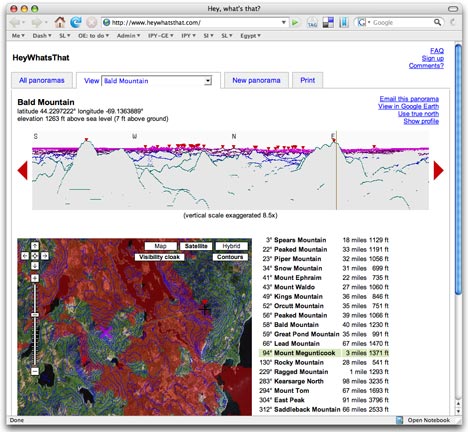
What’s that, HeyWhatsThat? it’s an automatic summit-perspective generator for any peak in the continental US. You can request the view from any mountain top, and HeyWhatsThat will use a database of summits and a DEM to show you what the view looks like from there, and annotate it for you.
hwtmaps.jpg

But that’s just the beginning. You can click anywhere on the horizon of the generated view to see its corresponding spot on Google Maps. Then, click on “show profile” to show the elevation of the path from the summit to that point. You can turn on a “visibility” cloak in Google Maps which paints red all those areas that are visible from your perspective. And you can also turn on contours on Google Maps.

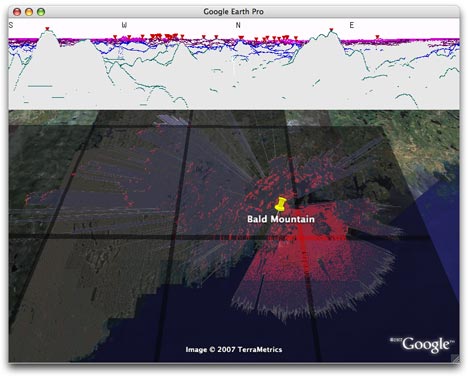
Then, click on the Google Earth link for a head trip. You get a network link showing all public panoramas. Turn one on, and you get an automatically generated overlay showing all visible areas from that summit in red, and an overlay showing the extent of your horizon. If you think this is too good to be true, as I did, just zoom on in onto the summit, and have a look around — everything is in red, just as it should be from that perspective.
hwtge.jpg

If you request your own panorama, the options are very well thought out. For example, when you choose a location on the map, you get given the opportunity to move to the highest nearby spot, so that you don’t accidentally get a generated view from just below the summit. Very nice.

One of the developers, Michael Kosowsky, writes that they’re working on making HeyWhatsThat work globally. As for browser compatibility: “The web site has been developed against Mozilla Firefox 1.5 and 2.0, and seems to run reasonably well with Internet Explorer 7. Other browsers may have problems.”

if this doesn’t unleash the inner geeky-nature-lover in you, nothing will:-)
Geophoto (for Mac)

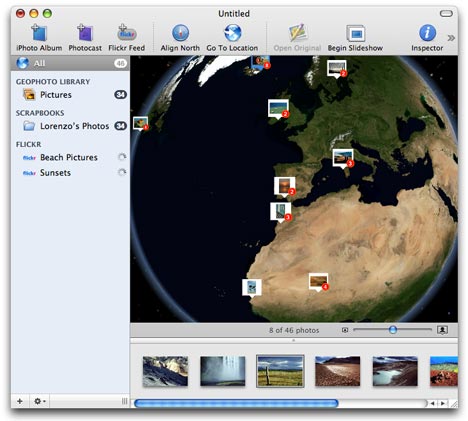
Ovolabs’ Geophoto is a new stand-alone virtual globe application for the Mac that lets you georeference and visualize photo collections. These collections can be your own iPhoto albums, Flickr images tagged by group, author or keyword, or even “photocasts”, photo RSS feeds. If you are familiar with iTunes or iPhoto, you will immediately recognize the Mac-standard GUI for media management. There is practically no learning curve to this application.

geophoto.jpg

And yet I’m conflicted about Geophoto. It is exceptionally simple, but it costs $50 for far less functionality than what you get in Google Earth (and its network link). That’s quite an audacious proposal.

So, quickly, my likes and dislikes about this application:

Likes:

  • It is goodlooking and it is simple to use. The use of a Mac-standard interface for a virtual globe is well done.
  • It is a standalone application, so it can do nifty visualization tricks like having photo popups merge as you zoom out.
  • It does not require an internet connection to run, so you can view your photos offline, if you like.
  • You can have multiple globes open at the same time.

Dislikes:

  • In the age of Google Earth and NASA World Wind, the resolution of this globe is terrible. Three years ago, this would have been impressive. And while I sympathise that getting high resolution imagery is a very expensive proposition, that’s the competitive landscape we find ourselves in now, and have been in since June 2005.
  • No layers other than the physical Earth. No roads, clouds, cities, etc… No height mesh (DEM) data either.
  • Georeferencing is a very coarse exercise. You have to do a search for a place, and if it finds it, you then get to set your photo to that place. There is no way to georeference a photo manually. Not that there is much use for such a feature, as the map is so coarse. (BTW, the search feature queries Geonames.org, so you have to be online to georeference. The imagery is a local copy of NASA’s Blue Marble Next Generation.)
  • There are no good navigation controls. You can’t pan and tilt, for example. And when the globe does move to a specific photo, it does so abruptly, without the organic feel that Google Earth or NASA World Wind have.

So who is this for? My Dad? He’s an avid photographer and not so much a technologist, but even he’d like to show what street corner a photo was taken from, rather than what city. People that are really into Maps and Macs? They’ve already discovered Google Earth, Flickr, and the different ways of using them together.

And it’s not as if the geospatial Mac market beyond Google Earth is a wasteland. If you want lots of layers full of context, there is Matt Giger’s EarthBrowser ($24). If you want to georeference your photos, you can use Google Earth and Geotagger (free), or your GPS device and Geotagging Automator Actions ($15). You can also export your georeferenced iPhotos to KML with iPhotoToGoogleEarth (free). And if you want to browse Flickr photos in Google Earth, there’s Trippermap ($10/year).

In other words, much as I like the idea of Geophoto, I don’t think it’s feasible as a $50 application.

Links: LIMA, gCensus, Jobo PhotoGPS, Geograph

  • The Map Room flags a great press release: The US National Science Foundation, USGS, NASA and the British Antarctic Survey are collaborating on the Landsat Image Mosaic Of Antarctica (LIMA) a project that is part of International Polar Year. The result will be the detailed dataset of Antarctica to date in the public domain, and I can’t wait to see this show up in Google Earth and NASA World Wind — though it will take a few months yet before all is ready.
  • This has been making the rounds of Slashdot and Co., and with good reason: Imran Haque’s gCensus, a US census visualization tool that involved him first writing a Perl library for turning census data into shapes in KML — now open source and part of CPAN as Geo::KML::PolyMap. Imran explains the process in this ExtremeTech article. You can also just dive in. He’s planning to turn much more of the code into open source.
  • Yet another GPS georeferencer for digital cameras: The Jobo PhotoGPS. The write-up of a pre-production model is a bit breathless, but this is what I think it is: An autonomous GPS device that you affix to the flash shoe of a digital SLR camera, so that when you takes a picture, it knows to save the time and location. No, this data does not get written into the EXIF data of the pic in the camera — you have to do that later, on your computer, after both the pics and the GPS data are downloaded. Also, the device promises to have an extremely long life being “only active when needed,” though that makes me wonder how long you need it to find satellites everytime you want to shoot. The above link comes with images.
  • Barry Hunter has upgraded the network link associated with Geograph, the collaborative project for photographing every square kilometer of the British Isles. The KML is all region-based now; writes Barry, “in this way the view starts depicting a course overview of the current coverage, zooming in reveals more detail until pictures themselves become visible”.
  • I love it when a story gets written along the lines of “X finds Y using Google Earth.” In today’s installment, X = a Dutch archaeologist and Y = the lost underwater castle of Hulckesteijn. The story in English, the original story in Dutch, the link to Google Maps, and the link to Google Earth. [Update: Not so fast, says a follow up article, in Dutch. Is too, is the response to the response.]
  • Not sure what this article in National Geographic is getting at: Terrorist Use of Google Earth Raises Security Fears. It all sounds a bit alarmist, and its credibility is marred by this:

    For many locations the images have a resolution as fine as 49 feet (15 meters) per pixel—enough to see individual streets, distinguish buildings, and even make out the color of automobiles.

    It leaves you wondering if the writer understands the notion of resolution… In National Geographic of all places!

  • Valery Hronusov strikes again: The Atlas of Moscow, 1853, as a superoverlay.

Links: Sardegna3D, 3D icons, 3D Warehouse for builders

  • TechCrunch agrees: Google’s YouTube caving in to Turkish censors is a terrible idea and a precedent for Google’s other user-generated communities — with Google Earth Community especially vulnerable to the demands of paranoid governments.
  • Sardegna3D (beta) is a 3D client for Windows that lets you browse the Italian island of Sardinia. It works well, though the GUI looks a lot like a copy of Google Earth 3 (not that there is anything wrong with that:-) Just as with France’s 3D Géoportail client, I still don’t see the merit of shackling a localized dataset to a specific client, especially if the client does not provide enhanced functionality. Much better is to free the data and place it inside the wider context of a global viewer like Google Earth or NASA World Wind.
  • This is really worth a look: bdkowert.com builds a 3D icon for the KML files showing FON’s wifi hotspots (which you can download under the POIs tab). What I like about it is that the use of 3D is not a gimmick in this case, but adds information. Download it from Google Earth Warehouse and check it out for yourself.

    fonicon.jpg

  • A story about the world’s most clueless teacher. She wants to block Google Maps at school.
  • Construction behemoth McGraw-Hill Construction has started putting its Sweets portfolio of 3D models of building products into 3D Warehouse. Here is the press release, and here is the collection in 3D Warehouse, which comes with more info:

    Sweets is in the process of building the largest collection of professional grade 3D building product models that are easy to find and download. In May, 2007, these high quality models will be organized by the CSI MasterFormat indexing familiar to Sweets users. As we build this collection, please come back and check its progress. The grand launch occurs at the American Institute of Architects annual convention May 3 – May 5, 2007.

  • Indian journalist and blogger Shiv Aroor is taking screenshots of Indian military bases in Google Earth and posting them online preemptively, “in case Google does buckle and censor its eyes over India. That would be such a tragedy.” (Via Sacred Media Cow)
  • 3PointD posts notes of the mapping panel at SXSW, chaired by Rev. Dan Catt.

Google Earth adds NZ roads, “global awareness” layers

nz2.jpg

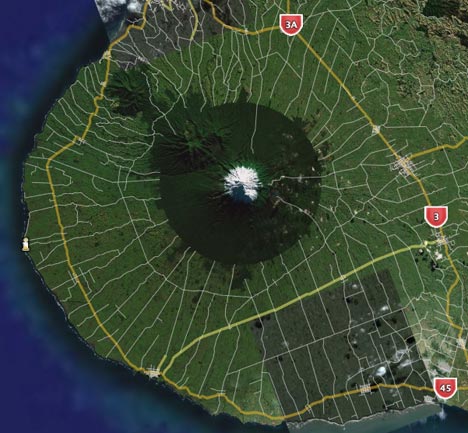
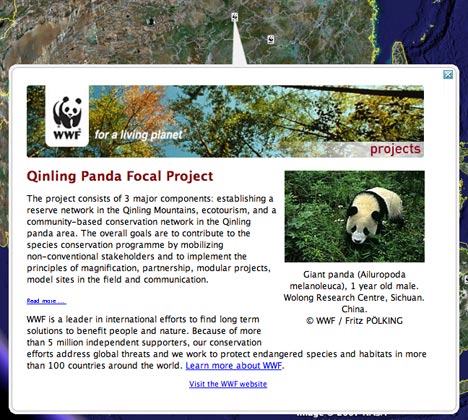
There’s new stuff in the default layers: New Zealand gets road data, the World Wildlife Fund gets to georeference its many conservation projects, and the mountaintop-removal coal mines in Appalachia get before-and-after overlays.

wwf1.jpg

In the existing layers, National Geographic expands its series of georeferenced articles and photographs to include new regions, including both Antarctica and the Arctic region.

Most other existing default layers get updated content. All the details are in this post at Google Earth Community.