LInks: Twittervision, Microsoft funding sensor web research

Easter weekend reading of note:

  • Mikel Maron looks at the possibilities involved with georeferencing Twitter messages, and how it’s being done in Twittervision, which maps the latest messages in real time. I can’t wait until my GPS-enabled phone automatically adds geotags to my twitters. (Main impediment to Twittering here in Cairo: Every sms goes to and comes from a UK number, which costs a non-trivial sum for cute but mostly trivial information. And that’s a pity, as Twitter couldn’t be more perfect as a developing-world publishing tool &mdash because everybody has a mobile phone. One challenge to overcome: It is relatively easy for more censorious governments to ban twitter, as all twitters come from and go to one number, which can be nabbed at the exchanges.)
  • While in the UK, the debate is about whether tax-payer funded GIS data should be made free, in Santa Clara County, California, the debate is about whether the terrorists taxpayers should have access to the data at all. Because, you know, Santa Clara is really high on the terrorist target list, compared to all the other counties in the US.
  • 3pointD flags the news that Microsoft is funding USD 1.1 million-worth of university research projects in sensor maps and mass GIS, and adds salient commentary.
  • Sometimes maps make the most eloquent political statement. Gregor J, Rothfuss uses MyMaps to map the top farm subsidy recipients from the USDA in the US and from CAP in the UK. Shameful.
  • Adobe’s AEC product manager blogs Adobe Photoshop Extended’s support for KMZ, and has a colleague explain more fully what this means.
  • All Points Blog: Is IBM the Next Major GIS Player? Most of the comments recommend that IBM go the open source route instead of buying ESRI, but one person mentions sagely that ESRI has lots of paying customers. Why not do both — and force James Fee to use Linux:-) (Missed it originally, via AECNews)

Easter weekend KML content of note:

  • A few weeks ago, The Map Room carried news of a new claim that the Portuguese in fact discovered Australia in 1522, a good quarter millenium before Thomas James Cook. Now somebody at Google Earth Hacks has taken the rather grainy image and overlaid it on Google Earth. It’s a pretty good match, it has to be said.
  • Rotterdam is using the occasion of its annual marathon to turn a good chunk of its buildings into KMZ files, some of them textured, to provide context for the marathon route, which you now fly along in Google Earth. (Hat tip to Tom van de Wetering of www.dutchearth.com, “an upcoming Google Earth Consultancy Company”)
  • Valery Hronusov does the obvious (with hindsight) with MyMaps, pointing a network link to the KML permalink for a Google MyMaps map and then having that refresh regularly, so that updates to the map are pushed automatically in all those who subscribe. Just be sure to send people the network link, then.

Nokia N95 and the end of censorship

Words cannot express how jealous I am of Andrew Hudson-Smith’s acquisition of the Nokia N95 and his subsequent blogging of its ample GPS functions, including its ability to save tracks as KML using Nokia’s Sport Tracker applet. I left Sweden what must have been hours before the stores were flooded with this remarkable superphone, and here in Cairo I am alas relegated to drooling at Gizmodo’s photos.

One thing I cannot wait to do is to take photos with its 5 megapixel camera that are automatically georeferenced, uploading them directly to my Flickr account via GPRS or wi-fi, and then having that stream outputted automatically as GeoRSS or KML. Similar functionality is available with videos published to YouTube, though I think here we’ll need to come up with some hack for georeferencing those.

I suspect the N95 will revolutionize reporting in countries with draconian restrictions on the media. Here in Egypt, crackdowns on demonstrations are routinely accompanied by roundups of photographers, who are then obliged to hand over their digital cameras’ memory cards. Already, the Nokia N93 has been used by CNN reporters to take video in situations where a big video camera would have drawn unwelcome attention, but the N93 still looks like a small video camera. The N95 looks like an unassuming phone at all times, so you can shoot while pretending to phone, and then, critically, publish the photos to the web directly, before anyone demands your memory card.

The ubiquity of mobile phones makes it easier for reporters to meld into the crowd, especially now that everybody is always recording everything anyway. It’s a cliché to say that we’re all reporters now, but with the N95, broadcast quality video and print-quality photos can be delivered instantly to the world. In Egypt, YouTube videos of police brutality and the harassment of women have already led to high profile court cases, purely on the strength of popular outrage. If governments are going to want to reverse this trend, they are going to have to ban mobile phones, but unfortunately for them, that particular genie is well out of the bottle.

Links: GPicSync, Ed Parsons => Google

  • GPicSync is a Google Code project for syncing GPS devices with the EXIF location metadata of photos, with the option of creating a KMZ version for Google Earth. PC and Linux.
  • Erstwhile UK Ordnance Survey CTO Ed Parsons starts working at Google as Geospatial Technologist for EMEA (Europe, Middle East and Africa). Sounds like a dream job! On the occasion, everybody gets to make a wish: James Free asks him to make Google Earth free for business use, Christian Spanring wants him to lead the convergence between GIS and neogeography, and I’ll ask him to sync Cairo’s road data with the satellite imagery:-)
  • Google Earth Hacks is going multilingual, with a Spanish language version, and more languages promised.
  • Now Thailand bans YouTube because some users uploaded caricatures of He Who Must Not Be Mocked, the Thai king. YouTube tries to comply by removing the offending content, but new stuff seems to keep on popping up. Once again, diverging standards of free speech clash, with the most restrictive winning out and becoming the universal standard. If censorship of this kind must be practiced in order for Thailand to remain a business proposition to Google, then I would much prefer it that only Thai IP addresses suffer the consequences of their sovereign choices. Once again, this is a precedent with implications for Google Earth Community.

Drawing in Google Maps vs drawing in Live Local: Which is better?

Two weeks ago, Google added the ability to subscribe to GeoRSS in Google Maps. A few days ago, Microsoft updated its Live Local mapping tool, adding the ability to publish your placemark collection as GeoRSS. Other improvements included enhanced drawing tools, but also a wholly underwhelming ability to see Virtual Earth 3D in Windows versions of Firefox (once again missing the entire point of using a web browser for delivering content).

And now, this morning, Google has updated its Maps product yet again, adding “My Maps”, user-generated collections of annotated placemarks, lines, and polygons. This is something of a catch-up maneuver for Google, or, more kindly, a change of tack: Until now, Google was happy to let third party developers use the Google Maps API to produce such services. Now it seems that Live Local/Live Search/Virtual Earth’s collections feature (available since May 2006) has goaded Google into offering a similar default functionality.

gmapsmymap.jpg

This sets the stage for a comparison, of course. I tried out both services this morning while in a bad mood — the best mood for reviews.

I decided to put some objects here in Cairo on the map. Using Google Maps to do this is very simple. Choose “Create new map” and several new icons appear on the map — for creating a placemark, a line and a polygon.

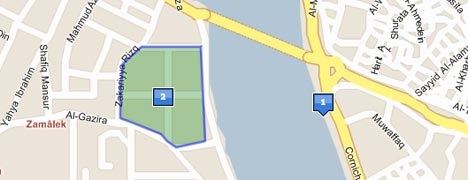
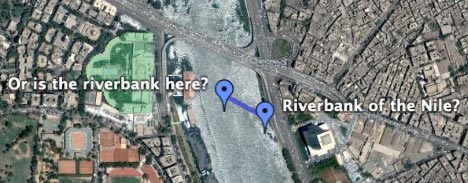
Zooming in on Cairo in Hybrid mode, we had a problem: Use the roadmap of Cairo, or the satellite imagery? Which one will be accurate in Google Earth? They’re misaligned by about 100 meters, so I decided to put a placemark in both possible spots, and then drew a line between them. Alas, the line didn’t tell me how long it was, so I couldn’t accurately measure the offset.

cairogoogle.jpg

None of this detracts from the fact that these new drawing tools are very easy to use. Editing is a cinch: Just drag a placemark to a new spot — you’ll find yourself doing it over and over again just to marvel at the lovely animations. Individual polygon points are also draggable, with plenty of visual feedback while you do so.

How does Microsoft Live Local stack up against this? Drawing the same content in hybrid mode for Cairo was a nonstarter — there is no high resolution imagery of Cairo, so no opportunity to misalign it. Using just the roadmap, then, I found the tools to be practically on par with Google Maps in terms of functionality.

virtualearthcairo.jpg

Some differences: In Google Maps, editing existing content is more intuitive — just drag a placemark, or right-click on an object for editing options. In Live Local you first need to find the item on your scratch pad. Unlike Google Maps, Live Local does measure distance and area automatically for lines and polygons — but in acres and yards, which is great if you’re Shakespeare. I looked everywhere for the option to use metric units, to no avail. Finally, when it comes to editing the contents of the popup window, Google Maps has more options — you can choose between plain text, rich text and full HTML, which includes the ability to embed YouTube videos and such.

Surprisingly, perhaps, neither service offers the ability to embed your map on your site or in a blog post, especially as the API makes it possible. Tagzania lets you embed your placemark maps — and, by the way, has published placemarks as GeoRSS for ages. Here’s proof, using Google Maps’ ability to read GeoRSS.

Live Local and Google Maps (and Tagzania) give you a permalink to your map. While Live Local will let you see your content in the browser using Virtual Earth 3D (but only on PCs), Google Maps (and Tagzania) offer a link to the map in Google Earth. How does that measure up? There are still some conversion problems for Google: In Google Maps, X marks the spot where the icon hits the ground. In Google Earth, X is at the middle of the icon. The result is that placemark icons are off-center in Google Earth, like so:

cairomaps.jpg

(In case you’re wondering, the satellite imagery in Google Maps aligns with the imagery in Google Earth. Google Earth doesn’t yet have road data for Cairo.)

So, the verdict: I will continue to use Tagzania for annotating places, especially as it uses tags to organize your “collections” and publishes them as both GeoRSS and KML. But tags are still something for the Web 2.0 crowd, not my parents, and Tagzania doesn’t do polygons and lines or embedded videos, so for this sort of project I’d recommend Google Maps over Live Local — mainly because the editing of existing content is more intuitive, and because you can stuff more stuff more easily into the popups.

(One more thing: Also added today in Google Maps: The search tool returns georeferenced content found in indexed KML files, just as has been possible in Google Earth for a month or so now.)

Links: Unype 0.2, Google Earth Library, iPhotoToGoogleEarth 1.03

  • Skype-based Google Earth controller Unype reaches version 0.2, gaining some significant new features, as explained on the app’s blog: You can now show an avatar of your choosing at your location, see others’ avatars, share models, and synchronize layer visibility settings with other users. This latter feature is great, because it in effect gives Google Earth shared states, much as in online multi-user networked games and Second Life. Oh, and you can of course still direct the view of others remotely, or follow along with another’s explorations.

    It’s Windows only, but that’s because the API of the Windows client is so much more sophisticated. Slowly but surely, Google Earth is turning into a MMORPG. Impressive.

  • There’s a new Google Earth blog on the block — and this one truly looks promising: Google Earth Library focuses on finding and cataloguing KML content for Google Earth (as opposed to highlighting landmarks or views in the base layer, something which many sites already vie to do). Much of what’s on offer looks useful for education, so especially educators should take a look.
  • Mac app iPhotoToGoogleEarth reaches version 1.03, and now its author, Craig Stanton, is off for six months hiking the entire Pacific Crest Tail. He’s geoblogging the trip, and is doing so using one of the most seamless implementations of Google Maps and blogs I’ve seen to date. There is a KML network link to subscribe to as well.
  • MIT Technology Review reports on a new computer model made by Ohio State University for determining the probability of traffic accidents in different times and places — with the results shows as KML in Google Earth:

  • Matthew Hurst at Data Mining has the list of all the universities taking part in Google’s 3D campus competition — that he knows of.

Google comments on the New Orleans imagery brouhaha

First this morning came the update to post-Katrina imagery for New Orleans in Google Maps and Earth’s base layer, and now an explanatory blog post by Google Earth general manager John Hanke. In it he confirms:

  • The post-Katrina imagery was removed from the base layer way back in September 2006, and nobody noticed until now.
  • The post-Katrina imagery has remained available since then via several network links downloadable from this site, for example this network link.
  • The new updated imagery of New Orleans is from 2006 and its publication was expedited after the outcry over the past few days.

The new imagery comes with no credit/sourcing, so it’s not clear whose it is.

New Orleans, take two

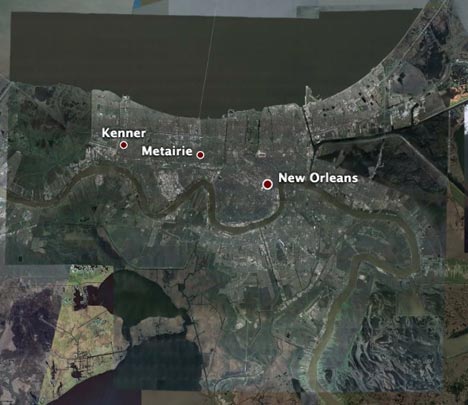
if you check out New Orleans this morning, you will now see distinctive blue tarpaulins on rooftops, construction in progress along the dykes, and a city that — from the air, at least — looks like it is springing back determinedly from Katrina.

In other words, Google Earth has just updated its imagery for New Orleans following a hue and cry after it became widely noticed that the existing imagery in the default layer was from before hurricane Katrina.

NOnew.jpg

Giving people what they want is obviously the best way to defuse PR “crises” such as these:-)