- Just-announced Microsoft Popfly is a competitor to Yahoo! Pipes. From the screenshots, it looks like formidable competition indeed, and there seems to be plenty of geospatial functionality included. (As this TechCrunch image makes clear, Geonames.org’s database is provided as a resource). The beta is closed, so I can’t answer the big question in my mind: Will Microsoft manage to provide output as KML, or will it succumb to not-invented-here-ism? If the latter, that would be a big mistake, one that Yahoo! has avoided and which would hand it the geospatial mashup stakes on a platter.
- Useamap.com, the map application with easy-to-remember map URLs that was rapturously reviewed on this blog a few months ago, just got better: You can now also permalink directions, and alternative maps are available if Google’s imagery happens to be low res.
- Currently playing on my N95: J2MEMaps, which impressively renders Google My Maps’s KML output on the phone as well as all georeferenced Flickr images for the current view; and a test version of 8motions by the same developer that looks so good you want to lick it.
- Got Crackberry with GPS? MobileTracker is for you. Exports your tracks to KML. $24
- Got PocketPC with GPS? GPS Tuner imports and exports KML. $24-$48
- Trip Tracker Sportsmate is a Dutch site that lets you upload your GPS tracks for analysis and commentary. They’re currently providing live tracking of several Dutch sports events as way of advertising their services and stress-testing their system. Events are viewable in Google Earth and are updated every second. TTSM’s Reiner Fleuren writes that they’re also planning on letting individuals do private live tracking in the future.
- Freeware Windows Image viewer IrfanView version 4.0 is out, and it has the following feature relevant to this blog: “New EXIF dialog button: Show in Google Earth (if GPS data available)”
- Google’s new universal search incorporates geospatial search, of course.
- Google gets serious about scaling up its 3D buildings creation for Google Earth, and licenses an automated technology developed at Stanford. Details on Google Earth Blog.
Yearly Archives: 2007
Censoring US imagery: Is there any point?
On May 8, AP’s Katherine Shrader had an interesting interview with Vice Admiral Robert Murrett, director of the US National Geospatial-Intelligence Agency (NGA) that got picked up by a number of newspapers. Murrett seems to be indicating he’d like a shift in US policy when it comes to the availability of satellite imagery in the public domain. It is well worth reading in its entirety, if you haven’t already.
That article, in turn, inspired a piece in the San Francisco Chronicle on May 18 (“Top secret, in plain view / Google Earth may blur the image, but others don’t“) that looks at the feasibility of efforts to censor imagery, and the patchwork results that localized censorship attempts produce. Nut graf:
This patchwork censorship raises doubts about efforts to protect some of the nation’s key facilities, a matter of high urgency after the terrorist attacks of Sept. 11, 2001. It also raises the question of whether obscuring aerial views serves any purpose, given that overhead photographs of many important installations are already widely available elsewhere online. And it shows the futility of attempts to control Internet information in the digital, online age.
And to underline that point:
Surprisingly, some of California’s most sensitive locations, including the Diablo Canyon nuclear power plant or Lawrence Livermore National Laboratory in the Bay Area, are not blacked out or blurred on any of the mapping sites.
What neither article really manages to drive home, however, is that the reason so many sites in the US are uncensored is because most security experts agree that the publicly available high resolution imagery is not a threat. They understand that such imagery is not current, not a replacement for an actual scoping of a place, and far more likely to do good than harm. And let’s not forget that there are always other countries’ satellite services available if US sources are censored.
There actually exists a very liberal US policy on disseminating such imagery (direct link to PDF), prepared by the USGS, though neither article mentions it. The policy paper implicitly berates self-styled “experts” at individual government organizations for taking ad hoc and paranoid positions on censorship.
The risk now, of course, is that Murrett intends to replace an enlightened policy with something more paranoid, in keeping with the current US administration’s wider obsession with secrecy. But that just leaves me wondering: It’s Murrett’s job to run an agency that analyses satellite and aerial imagery and hands the results to the Pentagon. Where in that job description is there a formal policy-making role?
I bet he doesn’t have one, though he certainly has access to a tool for making a de facto censorship policy, and it has even a name, according to Shrader: “Checkbook shutter control”:
During the 2001 invasion to overthrow Afghanistan’s Taliban regime, the geospatial intelligence agency bought up all the imagery over that country for several months, creating a blackout for private groups at the height of the fighting. The agency was criticized for embarking on “checkbook shutter control” and hampering relief work and public understanding of the fight.
In the past, the agency has said publicly that it doesn’t plan to take such steps again. But Murrett, who took over last summer, clearly sees moments where such information may have to be restricted, especially to protect U.S. forces.
“I think we may need to have some control over things that are disseminated. I don’t know if that means buying up all the imagery or not. I think there are probably some other ways you could do it,” he said, leaving the specifics to legal and policy experts.
Yuck. That’s a good example of how you can circumvent the letter of laws that protect the public interest with tactics that completely demolish the spirit of those laws.
Is Google Earth data reliable enough as evidence in an Iraq murder trial?
This is definitely an original use of Google Earth:
Judge Allows ‘Google Earth’ To Be Used In Marine’s Trial
CAMP PENDLETON, Calif. — A military judge ruled Thursday that a popular satellite-imaging program can be used at the trial of a Marine accused in the death of an Iraqi civilian to pinpoint locations relevant to the killing. […]
Military prosecutor Capt. Nicholas Gannon said each of Pennington’s descriptions of the area were “fair and accurate,” and that the images were “merely an electronic representation” of Hamdania.
But military defense attorney Maj. Dale Saran argued Google Earth was not a fair and accurate representation at the time of the incident, claiming the images could be manipulated.
“The government wants to put in a moving map display,” Saran said. “It’s not the same as a photograph. To say this is nothing more than a blowup photo is really stretching things.”
While I think Google Earth is a compelling presentation tool in almost every setting, I definitely get queasy when somebody’s judicial fate hangs in the balance based on the accuracy of Google’s data. And that’s because we know for a fact that what’s there today on Google Earth in Iraq is different from what was there before.
As for imagery on Google Earth possibly being manipulated: Google itself never doctors imagery. It prefers instead to remove offending tiles in their entirety and replacing them with older ones (as it did in Iraq). We have no such guarantees about Google’s imagery providers, however. The Dutch supply censored imagery, and several US state-level providers are similarly paranoid. There are no guarantees either that imagery is not doctored by sources to camouflage censorship, much as the Swedes do (though mercifully, that imagery has not made it into Google Earth).
In sum, I would much prefer it if law courts continued to restrict the use of mapping tools to those vetted by GIS professionals, who can accurately provide context for the maps and imagery used in court, including their dating, sourcing and reliability. This may be a moot point in the case of something as simple as a property dispute in the US, but when it comes to a murder trial and data from a war zone, I really don’t think Google Earth should be a reference — at least not until the metadata for its imagery is a lot more complete and transparently reported.
Metablogging Ogle Earth
The twice-weekly posting frequency around here is going to have to continue a while longer, alas, though Ogle Earth’s loss is Sweden’s gain, as the world’s first virtual embassy in Second Life is beginning to look really good (even if I say so myself). The launch and press conference are scheduled for May 30, and Sweden’s foreign minister Carl Bildt (who is a real tech-head and who also writes Sweden’s most popular blog) will be cutting the ribbon. Virtually, of course.
Tonight I fly back to Sweden from Cairo, where I’ll be spending most of the summer. I will, however, be in the US for a good chunk of June, first at ISDE5 in San Francisco (wearing my IPY hat) and then road-tripping up to Oregon before touching base in NYC. Plenty of mobile-GPS testing opportunities, then, though I’m getting exhausted just writing this…
Luckily there is Frank Taylor’s Google Earth Blog to pick up any slack on these pages. I do hope you also read his coverage — in fact I mostly assume Ogle Earth’s readers are also subscribed to Frank’s blog, as this allows me to avoid duplicate efforts.
I now hope to chase this post with a few more in the coming hours:-)
Mobile GPS mapping is today’s tricorder
Am I harping on about mobile mapping apps too much? I think we’re just getting started — this is an area that is currently experiencing rapid innovation. Now that so much information on the web has been georeferenced, in part due to Google’s ongoing KML indexing project, it makes sense to want to access the information when you’re there, on the move, where it is most valuable.
For a sense of just how fast things are moving, have a look at the Mobile Gmaps blog today, where developer Cristian Streng picks up on Ogle Earth’s Whale Valley posts from the past few days and then segues to some of the upcoming improvements to GMap-Track (which lets you publish your position to the web) — including individual tracking maps and the ability to publish GPS tracks to the server directly from the phone!
The big picture? There are two trends afoot, I think: In one direction, it is getting easier for geospatial content to make it to the mobile phone, filtered by GPS-determined location. In the other direction, it is getting easier for us to signal our location and publish geolocated impressions of our surroundings to the web. Where will all this end? When the device in my hand is not so much a phone as Dr. Spock’s tricorder, that ultimate location-aware information device and transmitter.
(And let’s not forget that Google Earth CTO Michael Jones claims the tricorder was one of the inspirations for Google Earth. In that case, I’m looking forward to Google Earth for Symbian:-)
Flickr => KML redux redux: Yahoo! Pipes to the rescue
Yesterday, when I had uploaded my georeferenced photos of Wadi El-Hitan to Flickr and wanted to publish them to Google Earth, I hit upon an unexpected snag: There were 31 photos in my Flickr set tagged with “wadielhitan”, but both RSS-based solutions I had reviewed in a previous post — namely Barry Hunter’s wrapper for Geonames and Mapufacture — suffered from a systemic drawback: Flickr only publishes the most recent 20 images to its RSS feed, even when filtering for a specific tag. Talking directly to Flickr via the API, as Trippermap does, avoids this limitation, but in my case Trippermap was geocoding the photos to South Africa, probably because a sign was being reversed.
I eventually worked around the problem by giving half the photos in my set one special tag and the other half another, and then running both feeds through Barry’s converter. But that was hacky.
This is why I am very happy to report on a new, much improved method that shows off both the genius that is Yahoo! Pipes and the coding prowess of Flickr API guru Steeev. He’s made a Pipe that takes your Flickr ID (and optional tag or group name) and returns the most recent 500 images that fit your description. You can get the result as a list, on a map, as RSS, JSON or KML, thanks to Yahoo! Pipes’s recently improved geospatial modules.
It works wonderfully. My 31 images tagged with “wadielhitan” were a cinch for the pipe (here is my KML file) and you can build your own KML file simply by adding the right attributes to a URL link. (Have a look at how the link in the previous sentence is constructed).
About the only thing I can think of to improve this would be for Yahoo!’s geospatial module to also offer a network link to the KML file, so that people can subscribe to it without having to go through that extra step (which still confuses some). (Oh yes, it would also be cool to be able to filter by sets as well, in addition to by tags.)
Whale Valley postmortem
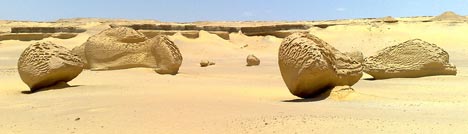
Yesterday’s trip to Wadi El-Hitan, Whale Valley, exceeded all expectations. I’ve never seen anything remotely like it, and I’ll be writing more about the experience on my personal blog.
I used the day as an opportunity to field-test the Nokia N95 as well as some GPS-enabled mobile applications — Mobile GMaps, GMap-Track and Shozu. My co-traveller friends thought I was a being an utter gadget freak, but I think I was able to convince them I was only doing this because I had promised I would write it up on Ogle Earth.
So how did the Nokia N95’s GPS functionality fare in real-world conditions? In short, really well. For the sake of concision, some subheaders:
Nokia N95 – GPS reception: The problems I was having getting a satellite fix on the N95 disappeared as soon as I hit the flat expanses of the desert. Cairo’s buildings are almost all made of reinforced concrete, which bounces GPS signals — in the more rural areas, I could get a fix in well under a minute, instead of the 5+ minutes in an open area in the middle of Cairo. For the duration of the trip, I had the phone simply lying next to me in the car — there was no need to hold it near a window to get a GPS fix.
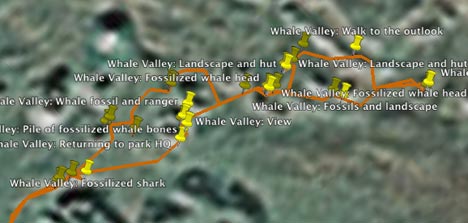
Nokia N95 – GPS Accuracy: The Nokia N95’s self-reported accuracy was never better than around 100 meters or so. That would be terrible, if true. Fortunately, I also had with me a Garmin etrex Legend, and it was getting accuracy readings as good as 4 meters (which is fantastic), so I could compare the positions the N95 gave to the photos I took with it with the Garmin’s baseline reference. It turns out that the N95 was attaching coordinates to photos that were always within 10 meters of the track that the Garmin was laying down:
Nokia N95 – Image quality: I ended up taking about 50 photos while at Wadi El-Hitan, all at the maximum 5 megapixel resolution, and put most of them up on Flickr in this set, so you can check out the quality of the original format yourself. I think the quality is very good — these images are all unmodified from the original.
Nokia N95 – Battery life: This is the N95’s much discussed Achilles heel. On the way to Wadi El-Hitan, I had Mobile GMaps running for as long as we had cellphone coverage (the first two hours out of three), with the GPS functionality turned on, and with a data connection sucking in new Google Maps imagery as required. This consumed 2 out of the 7 bars on the battery indicator.
Then I spent two hours taking around 50 5-megapixel photos with the GPS functionality turned on. Just as we were returning to the car, the low-battery warning appeared, so I turned the phone off. I think the 5-hour runtime I got was quite respectable, considering what I was asking the phone to do. A second battery is a must, however, which is perhaps why they are impossible to find at the moment.
Mobile GMaps: I think I’m in love with this application. I really did get to sit in a car travelling through rural Egypt as my mobile phone showed me scrolling high resolution Google satellite imagery, with a marker showing where I was at that instant. If we were driving past fish farms on the right, there were fish farms on the satellite image. A palm tree grove on the left? There it was on the image, right down to the individual trees. It’s the stuff of Sci-Fi or James Bond, except now it’s on my phone. It helps that Egypt, like most developing countries, has an extensive modern mobile phone network that allows data downloads, often at 3G speeds. As for how much this roaming cost me exactly, I have no clue yet:-).
Mobile GMaps controls the GPS functionality directly, so you don’t need to run Nokia’s default GPS application on the side. It doesn’t cache your data, however, so you really do need to be within cellphone range to use it. Placemarks in KML files that you may have downloaded previously are not cached either, so if you can’t download the file again, for example because you’ve driven into the middle of the desert, then its contents are not available to you and the application merely crashes. It would be very useful if you could save/cache both imagery and KML placemarks, so that you can browse content when outside cellphone coverage — which is where most interesting nature destinations tend to be.
GMap-Track: This service also worked exactly as advertised:
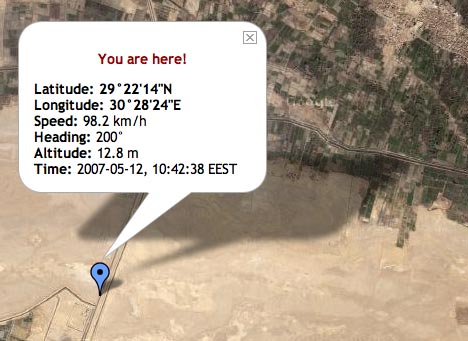
This is the last location the N95 reported, because soon after that we left cellphone coverage. But we were indeed going at nearly 100km/h in a south-southwesterly direction at that very moment. All I want now is access to a permalinked URL that shows my last position, instead of a public map that shows everyone’s. Another nice feature would be a subscribe-able network link that updates my position periodically in Google Earth.
Shozu: I’ve already written up Shozu enthusiastically. One thing it doesn’t do (and this wasn’t clear to me before) is write coordinate data to the relevant EXIF fields. I discovered this when I uploaded the images to Aperture this morning — the EXIF fields for latitude and longitude were left untouched. What Shozu does when I take a photo with the N95 is use the GPS fix to write geotags that are understood by Flickr. I’m hoping Nokia will soon update its camera software so that GPS data gets written to EXIF natively. The N95 has all the hardware to make it happen, so it’s a pity Nokia’s software isn’t making use of it.
Shozu also, of course, can’t upload my photos to Flickr when I am out of range of cellphone or wifi coverage. I ended up waiting until I got home before uploading full-size versions of the images to Flickr via my own wifi connection — in part also because I had run down the battery.
So, to conclude, The N95 performed admirably — I had no out-of-memory errors on the day, and the only crash happened when Mobile GMaps was left without cellphone coverage.
Here’s a KML file containing all the relevant contents for the day: The track made by the Garmin Etrex Legend, the boundaries of the Wadi El-Hitan protected area, and all the georeferenced photos I took with the N95, uploaded to Flickr via Shozu.