Jon Stewart doesn’t know dick about Google Earth

As you perhaps know, the residence of US Vice President Dick Cheney — the US Naval Observatory — is pixellated in Google Earth/Maps (and Microsoft Virtual Earth), and has been since the application launched. The White House and the Capitol are crystal clear, so why not Cheney’s residence? Is it a conspiracy?

Probably not. This issue was first raised by Maureen Dowd back in 2005 and deemed then to most likely be imagery processed along outdated guidelines. In a similar case, Google upgraded imagery of the White House when the existing view was shown to be doctored. In other words, Google has likely just never gotten round to finding a better un-pixellated view of Cheney’s home — so it would be unfair to blame Cheney for the state of his home in Google Earth, at least without some kind of evidence he’s behind the pixellation.

That doesn’t stop Jon Stewart at the daily Show from doing this, however:

At the very least, it’s more evidence of Google Earth’s grip on mainstream consciousness.

(Via Fantom Planet)

Links: Google geo-ads patent; Street View competitor

  • Want to know what Google’s plans are for monetizing its mapping products? You could do worse than read the following patent application, filed by Google on Dec 12, 2006 and published a few days ago: Determining Advertisements using user interest information and map-based location information (Via SEO by the SEA, which also takes a closer look at the details of the patent.)
  • Webware has a sneak preview of Earthmine, a georeferenced urban imagery system that aims to outdo Google’s Street View with clearer, higher-vantage imagery and (it is claimed) 3D data gathering abilities. ETA is later this summer. (Thanks Andy!)
  • Evan Ratliff’s big Wired article on Google Maps and Earth is out. Evan auto-reviews it on his own blog:

    As the online version’s headline implies (or possibly, overstates to the point of self-parody), it’s about how Google Maps and Google Earth are altering the way people relate to geography. Perhaps more interestingly, it’s about how thousands of people have taken the tools made by Google and other companies to become their own mapmakers.

    It’s an informed and worthwhile read.

  • Feed Validator’s KML support has now been officially announced on the Google Maps API Blog.
  • The joint-US/Mexico/Canada Commission for Environmental Cooperation today launches a KML layer mapping US, Canadian and Mexican industrial pollutant data. If you live there, it is worth checking out pollution sources near you. (Via the Daily Green)

Google in Africa: More Maps content, subsidized bandwidth

Google is opening its first office in Sub-Saharan Africa, in Kenya. Jonathan Thompson of Humanlink flags a really interesting tidbit in an interview by AllAfrica with Google’s new site lead, Joseph Mucheru:

Q: So what’s Google want to do?

Initially there will be three big things. Firstly, we want to optimise the use of Google applications in the region. We already have a lot of customers in the region but further development of the market is hindered by the absence of an international cable offering cheap bandwidth. Google understands that this is an impediment and is willing to go to the extent of buying international bandwidth [so] that locals don’t have to pay the current considerable premium they are.

The second thing they want to develop is their Maps product to make sure it has local information that is searchable and useful.

The third thing is using Google advertising in ways that can help monetize local content. Lots of people have done local content but most times it’s flopped. We hope to show that there’s a way of doing advertising that can support content. If we can do this, it will generate jobs and work.

The info about Google Maps is welcome but not unexpected. The bit about subsidizing access to the web (and thus Google) in Africa is a fascinating idea, and not one I’ve seen mentioned elsewhere. Writes Jonathan:

These developments has serious implications for aid workers who are based in the region. Kenya has long been the hub for South Sudan, Somalia and to some extent Uganda and Ethiopia. Let’s hope they cover South Sudan first. Not sure how they’ll handle the bandwidth issue. With the Google Earth Pro Grants program and increased capacity we’re looking at some substantive changes for the aid community.

HeyWhatsThat: The video and the mapplets

Michael Kosowsky, who’s behind HeyWhatsThat (the website for generating panoramas from digital elevation models that I gushed about a few months ago) was invited to give a Tech Talk at the Googleplex a month ago. Michael writes:

It’s the best summary I’ve got of what HeyWhatsThat is and how it got to be that way. If you aren’t inclined to watch the whole thing, I think the Andrew Wiles joke at the very beginning is pretty good.

Here is the Google Video:

What more news? This post pretty much write itself: Michael says:

Have just spent a few weeks doing what we call “refactoring,” which in this case means rewriting almost every single line of code with absolutely no change in functionality. Well, not quite; contours are now available at every zoom level at the main site and the Path Profiler (you used to have to zoom in fairly close to get the ‘Contours’ button to appear; now you can see contours while viewing the entire world) and profiles that traverse large portions of the globe will be drawn as quickly as short ones.

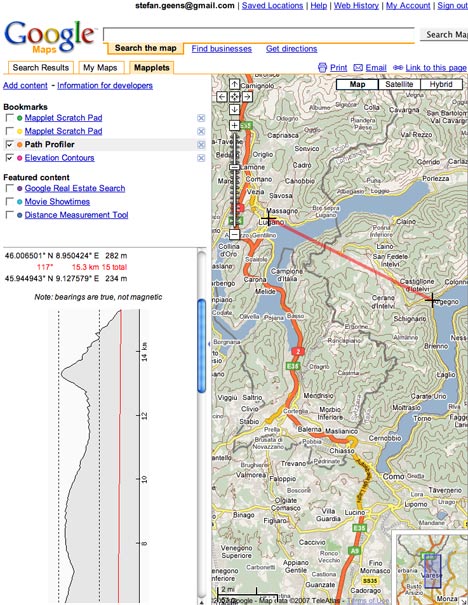
I’ve also created a pair of “Mapplets” for Google Maps: Elevation Contours and Path Profiler. To see what I’m talking about, start at

http://maps.google.com/preview

Hit “Add Content” on the left near the top. As of press time my mapplets haven’t appeared in their directory, so hit “Add by URL” and enter

http://www.heywhatsthat.com/contours.xml

and then

http://www.heywhatsthat.com/profiler.xml

Hit “Back to Google Maps” in the top left and you’re off.

The result is stunning, and really shows off the power of mapplets:

hwtmapplet.jpg

Picasa Web Albums georeferencing: How does it compare to Flickr, Panoramio?

In a continuing trend to have users add location metadata to content uploaded to Google servers (following YouTube), Google’s Picasa Web Albums has now gained the ability to let you georeference photos from inside the browser, using Google Maps. Here is the announcement on the Official Google Blog.

How does this newfound ability compare to the georeferencing via Google Earth available for a while now in the standalone version of Picasa (for Windows and Linux), or the georeferencing already available on Flickr and Google’s own Panoramio?

First, here is how it works in Picasa Web Albums (henceforth “PWA”): Everything is focused on simplicity. For any photo in your online account (1GB comes free), there is now an “Add location” link, which leads to an Ajax-ish Google Maps popup on the page itself that first forces you to search for a place and then lets you tweak the exact location.
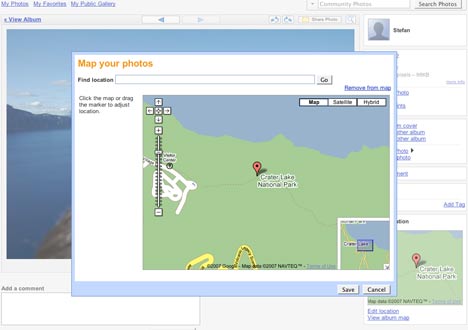
georef1.jpg

Georeference a number of photos in an album, like this one of Stockholm photos I have laying around, and the album itself can be viewed on a page in a layout that looks remarkably much like Google My Maps, down to the “View in Google Earth” link — which gets many kudos for its seamless integration. From this page, you can perform further tweaks simply by dragging the photos on the map. It couldn’t be any easier.
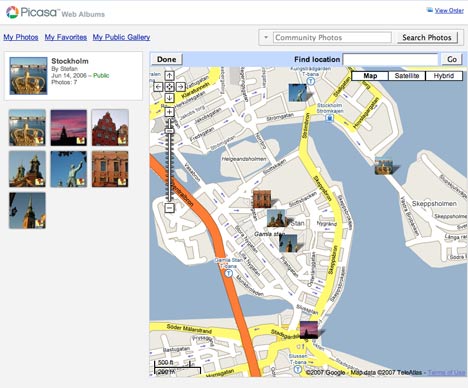
georef2.jpg

Stockholm

But there is one significant omission when compared to all the other services: Upload a photo that already has coordinate data in its EXIF metadata, as I did here, and it is not automatically mapped — you still have to georeference it manually.

If instead you first import the same photo to the standalone Picasa application, it does recognize the EXIF coordinate data, and will show you its location if you choose the menu item “Tools > Geotag > View in Google Earth”. If you then sign on to PWA from within Picasa, and upload such a photo to PWA, as I did here, PWA does automatically georeference it. (This makes Picasa far more geo-savvy than Apple’s iPhoto, Aperture, or in fact any other standalone PC photo editing tool I am aware of.)

[Update 2007-06-29: There is a preference setting that turns on the use of EXIF location data in PWA, but it is off by default. For security reasons? Importing from standalone Picasa overrides this setting, however.

contentPWA.gif

]

Unlike PWA, both Panoramio and Flickr use EXIF coordinate data [by default] during a browser-based upload, and will map the photos for you automatically: Here is the photo uploaded to Panoramio, and here it is uploaded to Flickr.

By the way, Panoramio’s georeferencing “tool” is almost identical to the one PWA has just gained. This leads to some interesting questions as to how/if these two services will be integrated. There is significant overlap between the two services, though Panoramio photos are almost entirely comprised of postcard-style landscape shots. One solution might be that in the future, if users georeference a photo in PWA, Google asks if it might be suitable for inclusion in the Google Earth layer of descriptive landscape shots. And as for visualization… I think PWA’s new My Maps look is the way forward.

The main advantage that both Panoramio and PWA have over Flickr is the seamlessness of their integration with Google Earth — it is just a link, as it should be. In Flickr, viewing in Google Earth still requires some hacking, though if Flickr’s Dan Catt has anything to do about it (and he does) there soon will be built-in KML links for Flickr images. Until then, Panoramio is the only service that both recognizes EXIF coordinate data upon upload AND outputs seamlessly to Google Earth, with the added ego-boosting bonus of finding your photos published to a default layer in Google Earth. [PWA can be made to use EXIF data via the settings.] (BTW, Panoramio yesterday announced that another 200,000 photos were added to the Google Earth default layer, bringing the total to 1.2 million.)

Google Earth Outreach redux

Frank at Google Earth Blog has a blow-by-blow account of the events at the announcement of the Google Earth Outreach project at the NYC Googleplex, Google’s Rebecca Moore has blogged it, and the 1-hour video is now out on YouTube:

YouTube? Wasn’t that supposed to be for <10-minute clips? Wasn’t Google Video supposed to be for longer pieces? This is a good example of Google in action as it integrates two very similar services it has ended up owning: Do a search for “Google Earth” at Google Video, and you get results from both Google Video and YouTube. The Google Earth Outreach Conference video posted by Google appears there too, but showing a YouTube URL. Click on it, and you get to see the YouTube page as a frame inside a Google Video page. Google Video appears to be in a process of being deprecated — for example, there is no option in Google Video to georeference videos, something which YouTube recently gained.

It will be interesting to see how/if Google integrates Picasa and Panoramio. Yahoo! solved a similar problem, having bought Flickr and owning Yahoo! Photos, by deciding to close Yahoo! Photos without automatically converting all photos to Flickr but instead by giving users a range of tools and options, including a conversion tool for Flickr (but not Picasa or Panoramio:-).

Dassault Systemes & Microsoft aim at Google 3D Warehouse

The other big news today: France’s Dassault Systemes launched 3DVIA, “a powerful platform for partners to deliver unique 3D experiences to all kinds of online communities in the consumer and professional arena” (press release), and then announced it is putting the underlying technology to work right away to build a competitor to Google’s 3D Warehouse, for Microsoft Virtual Earth 3D:

Combining Microsoft’s geolocalization technology with DS’s proven 3-D modeling and realistic visualization know-how, this [MSFT-DS] alliance will enable consumers to add an entirely new level of realism within Virtual Earth, providing an unrestricted freedom for creativity and innovation. (press release)

Explains Chairman and Chief Executive Bernard Charles to Reuters:

We want to do the 3D Flickr.

That’s nothing if not ambitious. And how is all the metadata going to be managed? By creating a new 3D XML specification and player, called, er, 3D XML. In the announcement from two weeks ago, 3D XML is called a “universal, lightweight XML-based format”.

Universal is good, so I headed over to 3DVIA to check out the 3D model of the iPhone. It turns out that the 3D XML player is Windows only, but luckily 3DVIA also supports the 3D Life Player, which works on the Mac. There is even some code to paste to show off 3D on any website, so let’s test it here:

For Macs:

For PCs:

(Does the Mac viewer make your browser unstable? Also, I wish I didn’t have to provide both viewing options manually.)

All in all, I’ve come away impressed — for example, it supports the importing of all manner of formats (though not SketchUp’s native format). There is much more that we’ll need to figure out — such as, how open and expandable is the metadata format, and will it meet Avi Bar-Ze’ev’s requirements/wishlist for a semantic 3D web? Avi from a year ago:

What we really need is a new language of object representation that encapsulates and preserves form and function, aesthetics, style, meaning, and behavior, all tightly coupled and never discarded in the “art pipeline” until the object is finally rendered on your screen.

This certainly looks like a step in that direction.