Google Earth gets the Simpsons treatment:
Nothing spells mass cultural relevance quite like a cameo on the Simpsons. Historic, I’d say:-) (Via Rudd-O)
Google Earth gets the Simpsons treatment:
Nothing spells mass cultural relevance quite like a cameo on the Simpsons. Historic, I’d say:-) (Via Rudd-O)
Suddenly, not one but two articles examining the implications of KML 2.1’s <Metadata> tag: Adding Metadata to Your KML Files on the Google Code site, by Google Geo Team member Mano Marks; and Transporting GML in KML by Ron Lake on his blog.
Both articles explain how the <Metadata> tag allows KML to ascribe properties to the content it is depicting. Ron Lake uses GML as an example, while Mano Marks uses ObsKML, developed by Jeremy Cothran (who is not a newcomer to this blog).
(In part via Sebastian Good’s blog, where he comments: “And there it is. KML is the new shapefile.”)
Takashi U posted his finding in Japanese to Flickr, but the screenshot needs no translation: Google Spreadsheets does geocoding.
Sort of, at least. It’s an undocumented feature, and it may be because it isn’t ready for prime time yet, but the implications sure are interesting, especially if you’re looking for ways in which a future Google Office might use Google’s strengths to leapfrog Microsoft.
Basically, just fill a cell with =GoogleLookup(“New York”, “latitude”) and up comes the answer. Instead of “New York”, you can reference another cell, of course, like so:
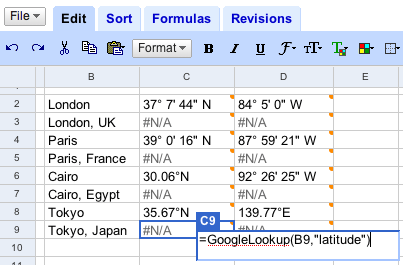
But here’s the problem: This isn’t yet formalized geocoding, and the sources are varied. For Cairo, for example, the latitude is correct and comes from three reputable sources (just hover over the cell to view them) but the longitude is for Cairo, Illinois. Specifying which Cairo (or Paris, or London) by appending a country name doesn’t work at the moment.
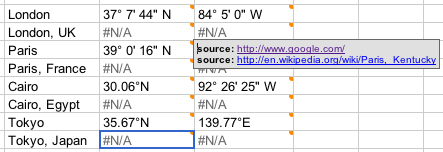
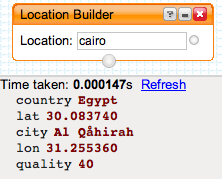
Still, this is a wonderful conceptual leap, and it has implications that are similar to Yahoo!’s Pipes, which, by the way, got a serious geocoding module two weeks ago as part of a major update. (Yes, it gets coordinates for both Cairo and Paris right — GoogleLookup does not).
Remember, too that you can reference individual cells in Google Spreadsheets, like so. (The easiest way to turn a spreadsheet into KML is still through EditGrid and its support for XSL, however.)
Francophone versions of Google Earth are showing detailed results of the first round of presidential elections in France, held last night, as a default layer — so reports French cartography blog Renalid, with plenty of screenshots.
This layer is not available in other language versions of Google Earth, though there is a special page on Google Earth’s Francophone site that provides the layer as a standalone file. (Except that for me, at least, the standalone file only contains a popup for Paris, and results are still pending.)
And as a student of global politics, I really would love these results in my English language version of Google Earth by default (if not turned on, necessarily). In addition, language choice is a bad determinant of national affiliation. Lots of Belgians, Canadians and Africans speak French. Lots of Frenchmen have English versions of Google Earth. Trying to guess what news is interesting to people based on their choice of download language is as fraught with risk as trying to guess what measurement system people use from their IP address. Read Michael Jones’s comment — there is an obvious solution. Apologies for the lapse.
Way too much cool stuff, way too little time, so forgive the rapid-fire delivery. Much of the below could do with an own post…
Simple, effective, cross-platform position sharing has just made it to Google Earth: It’s called GE Sharing, it’s by a German new media company called DIVIS, and it works like a dream. They’ve even got a way to monetize it:-)
I’ve just been showing my brother-in-law Nazz in London some cool places here in Cairo on Google Earth, and then he showed some cool places in London. Here’s how we did it:
I went to this page. I entered my name and email, Nazz’s name and email, and clicked the submit button. (Click on the UK flag for the English version.)
We both got an email from DIVIS, each with a different, unique KML file. We fired up Google Earth (he on a PC, me on a Mac) by double-clicking on the file. My KML file contains two network links, selectable via radio buttons — one for serving my position and view, and one for following Nazz’s position and view.

Because I sent the email, my network links is originally set to server, while Nazz’s is set to client. Until both our network links sync, the cute graphical overlay looks like this:

When we’re both ready to move, the graphic turns into this:

As I move, my network link sends my position data to DIVIS’s server, which instantly uses it to update Nazz’s network link. The client network link updates every time the view stops moving, so it is always on the move if I am. We used a chat program to communicate while we moved, and the combined effect was natural and fluid.
When it was time for Nazz to show me something, I selected the “client” network link while he selected “server”. They synced, and suddenly my copy of GE followed him. It just works.
Some feedback:
How is this different from Unype? Because GE Sharing doesn’t rely on the Windows API, it is platform independent. However, for the same reason, it can’t do some things Unype does, like layer visibility syncing, avatar depiction and model sharing. But for showing potential holiday spots to far-away family members, or taking house buyers on a remote tour of available properties, this can’t be beat for its robust simplicity.
How is DIVIS planning to monetize this? Simple: one-on-one sharing is free, but one-to-many sharing will be a pay service.
I’ve been sending emails to people located in Sudan asking if they could corroborate the Sudan aid worker’s strange report of no longer being able to download copies of Google Earth locally, though still being able to access the data servers. Somebody at the (wonderful) Sudan Tribune was kind enough to try, and even sent me a screenshot of the result:

That’s exactly the same error message that the aid worker got — and it certainly looks like it’s being served by Google.
What’s going on? A response from Google has now solved the mystery. Sudan isn’t censoring anything. The US is restricting access to Google Earth in Sudan. So says Google spokesperson Megan Quinn in an email:
In accordance with US export controls and economic sanctions regulations, we are unable to permit the download of Google Earth in Sudan. More information about these controls and sanctions can be found here and here.
I went looking, and found some relevant extracts, first from the US Treasury’s site:
SELLING TO SUDAN – Except for information or informational materials and donated articles intended to relieve human suffering, such as food, clothing and medicine, and the licensed export of agricultural commodities, medicine and medical devices, no goods, technology, or services may be exported from the United States to Sudan, either directly or through third countries, without a license.
There are exceptions for humanitarian NGOs and such, but not of the kind that allows downloads of software as is made clear by a page on the Bureau of Industry and Security’s website:
This rule also allows the export of software controlled under ECCNs 4D994 and 5D992 that is used in conjunction with such basic telecommunications devices or computers. However, the rule is not intended to be a vehicle for software exports per se. The software must be loaded onto the commodity prior to being exported and remain loaded on the commodity while in Sudan. These two software ECCN’s were included in the rule so that the commodities authorized for export by the rule could function in Sudan. They include typical “mass market” operating systems and applications software (such as office suite, email and web browser programs) for personal computers, cell phones and personal digital assistants. This rule does not authorize the transport of software controlled under any other ECCN to Sudan.
And even then, you have to be an NGO working under USAID authorization in Sudan. Only then can you bring a copy of Google Earth into Sudan, on your laptop. (If you’re not an American, I assume you may do whatever you want:-)
I don’t know if Google can apply for and get a license from the US government for internet downloads of Google Earth in Sudan, but it certainly sounds like it would need one before such downloads are legal. (I wonder then, too, if small software companies selling software online also have to check that the purchaser’s provenance isn’t an IP from Sudan?)
There are cases where sanctions have worked in the past (notably against South Africa under apartheid), and targeted sanctions also make sense for Sudan — for example, Rolls Royce shouldn’t be there, as oil-sector sanctions are key — but often the collateral damage is huge. In the case of Google Earth not being available for download in Sudan just as it becomes the single best tool for visualizing the genocide there, it is also highly ironic.
So let us count the ways in which the current implementation of US export restrictions on software downloads are nonsensical:
Sudan’s president al-Bashir is no doubt grateful to the US right now that his people are being shielded from some rather unpleasant truths about his regime. Perhaps other despots can take note and also start clamoring for US export bans on Google Earth.
(In the meantime, Declan Butler, Brian Timoney, Brian Flood and USHMM’s Michael Graham are looking into producing a version of the Crisis in Darfur layers for Google Maps, which, if you’re in Sudan, you will only be allowed to view on a Norwegian web browser:-)
PS: How does US export law treat web applications and web plugins? Virtual Earth 3D? Google Docs? Where does “information” end and “software” begin? Where does open source software reside, legally? Can I download NASA World Wind in Sudan? Can I send copies of Google Earth Free from Cairo to friends in Sudan if I’m American? What if I’m Belgian? Just asking hypothetically, of course:-)
