Google Sky gets a new, improved planisphere

sunmoon.jpg

Just what I was looking for to illustrate an upcoming post: HeyWhatsThat has posted an improved dedicated planisphere for Google Sky, with plenty of display and animation options. Take it away Michael Kosowsky:

Thanks to everyone for the great reception you’ve given the planisphere.

Three additions: I’ve added the Sun, Moon and planets; you can now animate the night sky; and I’ve put together a web page to simplify the process of creating a planisphere.

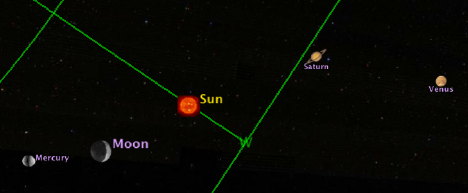
To try it all out, head over here. Find yourself on the map. Select the next to last option (a full day at one hour intervals) and hit “Submit.” When Google Earth opens up with our overlays, open the “Sun, Moon, planets” layer and double-click on “Sun” to center it, then start the animation. You should be able to watch the Sun cross your horizon. (Actually, your horizon crosses the Sun; you’ll understand what I mean when you try it.)

Quick tips for running the animation: A slider appears on the top right of the window when you load an animation. Hit the big arrow to the right and stuff should move. There’s a cursor you can manually drag. Click on the icon that looks like a clock to the left of the slider to set options. More documentation here and at the planisphere FAQ.

I have early reports of things not working quite right under Vista, in particular lots of overlapping copies of the horizon and grids appearing at once. If this happens, make sure the animation slider isn’t spread out to display an interval — there are tiny arrows on top of the slider to widen and narrow the interval, and you want it reduced to just a line — and try turning off some layers. If you encounter this problem and find a solution, please let me know.

KML hackers:

  • Can you dynamically change the viewpoint as the animation proceeds, e.g. <TimeSpan>’d <LookAts>? Then we could make the sky rotate around a fixed viewpoint, just like desktop planetaria.
  • Any way to set the time on the animation slider when our KML loads, sort of a time analog of <flyToView>?
  • Can you tie a NetworkLink to the animation slider? The idea is that if you moved the slider cursor to a particular time, I’d send you the overlays for that moment.

Enjoy, MK

While the default layers also have the positions of the Moon and planets, HeyWhatsThat’s network link has the Sun, and can be used to easily find current positions without needing to fiddle with the time browser.
Links: ViewAt, Gotwit KML, VeoGeo, MP3 in GE

After a week of sucking Internet through a straw, the connection at home here in Cairo is finally restored, and all systems are go:

  • Panoramas: 360-degree panorama collection sites Arounder and 360 Cities get a worthy competitor: ViewAt.org, which has a prominent button pointing to a KML version of the panoramas and a truly wonderful full-screen mode (via the browser). What I want to know is, which of these sites will be the first to convert their panoramas to KML 2.2-savvy PhotoOverlays inside Google Earth?
  • Sky spreadsheets: Valery Hronusov updates his spreadsheet-to-KML templates so that they can now also contain astronomical objects.
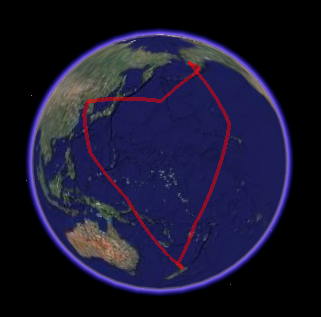
  • Migratory bird tracks: RobinNZ CAD Blog over in New Zealand has news of the migratory Gotwit bird that flew 30,000km, tracked via satellite and with its very own KML track:

    twitt.jpg

  • Video + GPS: VeoGeo merges video with a GPS track to bring you the video, a corresponding live location on the map and telemetrics data. Fantastic! (Via Mapperz)
  • Tiberium Earth: I hadn’t seen this before: Electronic Arts has an extension for their Command and Conquer 3 Tiberium Wars game, called Tiberium Earth, wherein players are invited to model structures from the game using Google SketchUp and then upload them to Google Warehouse. Players get a modeling toolbox with common components to get them started. Here are the results. (Via Slog)
  • MP3 in Google Earth: GE Lessons has a tutorial up that shows you not only how to embed Flash in popups in Google Earth for Windows, but mp3 files and other Windows Media-compliant files. (This KML is currently not supported on Mac and Linux.)

  • Tutorial repository: Digital Urban now has a reference page containing all the tutorials posted there to date. Quite a collection of new-media how-tos.
  • RouteBuddy 1.4: RouteBuddy, a computer-based navigation program for the Mac, becomes a lot more interesting with version 1.4, now that KML import and export is supported. Version 1.3 saw the addition of routing directions, which means that the two main criticisms of this program in my original 1.0 review have now been adressed. But is RouteBuddy a must-have at $100, plus the cost of maps? The main advantage to this application remains the ability to access maps and directions when you are away from the internet. Otherwise, Google Maps does a great job for the unbeatable price of Free.
  • GeoJournal: A new geocaching application for the Mac. $25.
  • Steve Fossett search: All Points Blog has the search for Steve Fossett covered. Amazon’s Mechanical Turk has been brought into the effort, and now this story too has gone mainstream: The Guardian‘s article on the search has a remarkable datapoint:

    There are 129 known crash sites in Nevada, but officials estimate that over the last 50 years more than 300 small planes have disappeared in the state.

    That’s one every two months. Here’s where Google Earth’s slightly older imagery can be of use — to filter out false positives from he new imagery.

  • Flight simulator tips: Google Earth blog has the flight simulator in Google Earth covered: An explanation of the HUD and some flying tips.
  • Standing back for a second: That’s quite an amazing couple of weeks for Google Earth’s mind share. The release of version 4.2 generated remarkable mainstream publicity from its Sky feature, and then a week later there was another wave when the hidden flight simulator feature was uncovered. Such a double whammy would not have happened if one of the features hadn’t been turned into an easter egg:-). And now there is a highly visible campaign to crowdsource the search for Steve Fossett using an overlay in Google Earth. What’s next?
  • ESRI PR: ESRI ArcGIS Explorer build 410 gets a press release announcing its availability. Finally!

Google Sky paper in arXiv.org

The Daily ACK‘s Alasdair Allan has a great find on arXiv.org, the online repository for physics papers:

Sky in Google Earth: The Next Frontier in Astronomical Data Discovery and Visualization

It’s by the people who built the Sky functionality in Google Earth, and the whole thing is a worthy read. Some of the highlights that caught my eye:

The underlying imagery used in Sky resides in a lat/long projection (Snyder 1926). This results in substantial distortion at the poles even when re-projecting onto the sphere. Thus, for regions within five degrees of the pole we replace the original images with a lower resolution view of the sky derived from the Tycho II catalog (Høg et al. 2000). […]

The underlying projection and registration of images in Sky is based on the technology used in Google Earth. This provides a mature visualization platform on which to develop Sky, a very large user base, a simple but extensible interface and a well-defined and on-going support and development mechanism. It does, however, lead to a small number of trade-offs — related to the way geospatial data is served — that were made in the course of adapting the system to serve astronomical data. […]

As with Google Earth, the basemap is not static and we anticipate continued improvements as we refine our treatment of the current imagery and new large-scale datasets become available. […]

It is worth noting that planets’ and the Moon’s icons are not scaled according to their actual appearance on the sky so that they can be more easily distinguished from the background stars. […]

(If that was the reasoning behind not showing real-size icons then I think this was a mistake. In the Google Earth environment, you can always zoom in more to see detail if you wish. More likely, the limitations on controlling the size of an icon via KML as rendered by Google Earth is to blame. Another problem that will need to be solved: Which planetary icon comes before which, and when? Layers in Google Sky behave like Ptolemaic spheres inside spheres, but planetary orbits do not. Sometimes Venus occults Mercury, sometimes Mercury occults Venus…)

The KML tag name GroundOverlay is inherited from Earth, but these are simply images projected against the basemap in Sky. […]

(Pace Vint Cerf:-)

As mentioned previously, since Sky shares a rendering engine with Earth, the geometry of the sky is, in fact, a slightly oblate spheroid (technically, the WGS84 projection). The GIS community has developed a number of tools for handling re-projections of images using this geometry, most notably the Geospatial Data Abstraction Library (GDAL). This software can warp images from one projection (including a tangent plane) to another and encodes the geometric information necessary for registering the image on the sphere in either an image header (analogous to a FITS header) or an associated “world file”, depending on the image format. While users may want to become more familiar with the GDAL software themselves, we provide a simple, open source tool wcs2kml which will read in an image in a variety of formats and WCS information from a FITS header and generate a properly warped image and overlay KML for you. This tool is available in both Python and C++ versions.

[What! The sky is not a perfect spere? :-)]

PhotoOverlay: Works inside pyramids too

Every day at 9am and 1pm, a small group of people who wait in line get to pay 100 Egyptian pounds ($18) to climb into the Great Pyramid of Khufu and all the way up to the burial chamber. Cameras are confiscated at the entrance, because otherwise who will buy the postcards? Luckily my Nokia N95 was let through as it was deemed just a phone.

Standing in the middle of the most impressive architectural feat ever (in my opinion) is a humbling moment. It’s very warm in there, and there is a very deep and pervasive rumble, which we eventually sourced to the ancient ventilation shafts, through which the air was rushing. I took out my camera phone — not surprisingly, there is no reception inside a 7 million tonne stone monument.

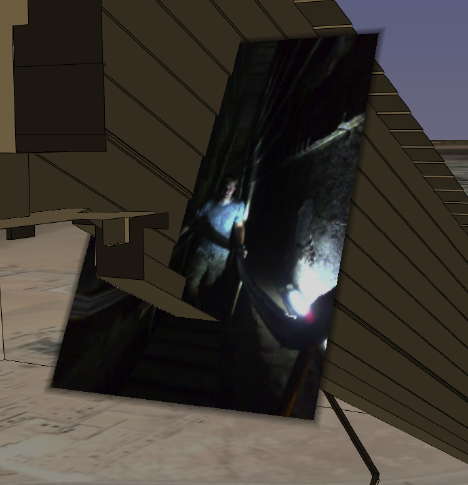
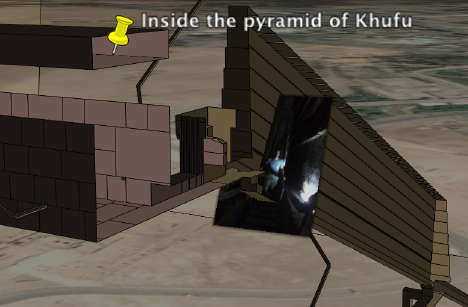
A visiting friend happened to be walking up the steps of the Great Gallery so I took a picture. Where exactly were we? ATF’s accurate 3D model of the pyramid provides the best possible contextual information, and since you can now accurately position photos on Google Earth, why not combine the two?

khufu.jpg

khufu2.jpg

Download ATF’s model of the Great Pyramid, then download this photo, added using version 4.2’s <PhotoOverlay> tag, to see where inside the pyramid it was taken.

The Economist covers the geoweb

A disadvantage of living in Cairo is that The Economist doesn’t arrive at newsstands until Monday, Sunday if you’re lucky. Fortunately Tech Consumer points the way to the online edition of this week’s Economist Tech Quarterly insert, whose leader article is one of the best overviews I’ve read of the geoweb, neogeography, virtual globes, mashups, and the security and privacy implications. There’s references to Snow Crash and copious quotes from interviews with Google Earth’s Michael Jones and John Hanke and Microsoft Virtual Earth’s Vincent Tao: The world on your desktop. It is free to read without a subscription (at least for me, at the moment).

That this article should appear just now and so prominently in a newspaper with a large readership in the business world is a bit uncanny, given this week’s revelation that Google Earth Free has become a legitimate tool for use at work. All those CEOs calling their CTOs asking why they don’t have Google Earth installed on their corporate laptop can now be told there is no legal reason why not:-)

While there’s not much news in the article for those who have been reading the geoblogs closely these past few years, for everyone else this is a lucid and penetrating introduction to the geoweb. If your mother has been wondering what precisely this geoweb is and has been complaining how she doesn’t understand any of it, send her the link to this article. I have:-)

New EULA for Google Earth Free/Plus: “Internal use” at work is OK

Frank Taylor brings news of the newly updated release notes for Google Earth version 4.2 and rightly homes in on a major change: Updated terms of service for Google Earth Free and Plus.

In brief: You can now use it at work for “internal use”.

The most important bit of the new license now reads like this:

1. USE OF SOFTWARE; RESTRICTIONS

Use of Software. For an individual end user, the Software is made available to and may be used by you only for your personal, non-commercial use according to these Terms of Service and the Software documentation. For a business entity user, the Software may be used by you and your employees for internal use according to these Terms of Service and the Software documentation (individual end users and business end users are collectively referred to as “You” herein).

Restrictions. You agree not to use the Software in connection with or in conjunction with a system in a vehicle that offers real-time route guidance or turn-by-turn maneuvers. You agree not to use the Software for any bulk printing or downloading of imagery, data or other content.

Whereas previously we had this, in version 4.1:

1. USE OF SOFTWARE The Software is made available to you for your personal, non-commercial use only. You may not use the Software or the geographical information made available for display using the Software, or any prints or screen outputs generated with the Software in any commercial or business environment or for any commercial or business purposes for yourself or any third parties. You may not use the Google Software in any manner that could damage, disable, overburden, or impair Google’s services (e.g., you may not use the Google Software in an automated manner), nor may you use Software in any manner that could interfere with any other party’s use and enjoyment of Google’s services.

(My italics) A “Find Differences” in BBEdit finds very few further differences between the two texts. Lawyers wanting to peruse both texts can use this link to the license from version 4.1. One minor change in version 4.2 is a link to a standardized Google policy on privacy (instead of spelling it out in the text). Google’s data licensors are also referenced together with Google when posting disclaimers, and this paragraph is new:

3. PROPRIETARY RIGHTS

a. Google. […]

b. Third Parties. Data for map content in the Software is provided under license from Google’s licensors, including by Tele Atlas North America, Inc. (“TANA”) (the “TANA Data”), and is subject to intellectual property rights owned by or licensed by TANA and such other licensors. You agree that you will not engage in, and may be held liable for any unauthorized copying or disclosure of this material. By using the Software, you agree to make TANA a third party beneficiary of this agreement. Your use of TANA Data is subject to additional restrictions located in the following Legal Notices page: http://www.google.com/intl/en_us/help/legalnotices_maps.html.

So what does “internal use” mean for a business user? I am not a lawyer, but my understanding is that Google Earth Free finally becomes a proper universal browser of georeferenced data. You no longer need Pro to do geoweb surfing at work, or to search and view KML files, even for doing business-related research or intelligence gathering, much as you would use an ordinary web browser to gather information from the ordinary web. Nevertheless, I suspect this new license does preclude businesses from using the Free application to produce commercial geospatial products. That would result in an “external” application of Google Earth. But, again, IANAL. Google Earth’s “Software documentation” is given as a source for further explication, but the online legal FAQs are currently still the old ones.

Also of interest is the restriction that prevents third parties from offering a sat-nav solution for cars that involves running Google Earth, much like the setup demoed by Volkswagen 18 months ago.

(Note: I’m still working setting up a reliable internet connection (again) in a very hot Cairo, so pardon the flagging blogging around here for another week.)

Neogeo job, anyone?

Looking for a neogeo job?